Home Blog

The Easiest Context Engineering Guide You Will Ever Read

0

Artificial intelligence is moving fast. Many new terms show up on the internet every week. Some of them fade away. Some of them become important foundations for the future of AI. One such term that is now getting serious attention is Context Engineering and its advanced form called Agentic Context Engineering. You may have also heard people say things like “Prompt engineering is dead” or “The future is context”. So what does all of this actually mean and why is everyone talking about it?

I have spent months learning and experimenting with prompt engineering and context engineering. I wrote this guide assuming you have zero background in artificial intelligence. Everything in this Context Engineering 2026 Guide is explained in simple, clear language so you can understand how this new idea is shaping the future of AI and why it matters for anyone using or building generative AI systems.

First, What Is Context?

Futuristic digital city background with “CONTEXT?” text

Before learning about context engineering, it is essential to understand context itself. Context is the background information needed to make sense of something.

If someone asks an AI chatbot to “write a follow-up message”, the AI cannot know what kind of message to write unless more information is given. A follow-up for what? A job interview? A sales call? A research request? That missing information is context. Context gives clarity. Context gives meaning. Context makes understanding possible.

Inside AI systems, context plays a similar role. When you talk to a chatbot like ChatGPT or Claude, the AI reads your message and responds. But how does it know what you are talking about? It knows because of context. It remembers earlier parts of the conversation. It follows instructions. It connects ideas. All of that is context.

Context shapes the quality of AI outputs. Better context produces better responses. That truth led to the idea of context engineering.

What is Context Engineering?
AI-themed background showing “Context Engineering” concept

You might already be doing context engineering without knowing it. Think about how you usually chat with AI tools. At first, you type something short like, “Write a reply to this.” The AI gives a weak answer. So you try again. This time you give more details. You paste the message someone sent you. You explain who that person is. You explain the situation. Then suddenly, the AI gives a much better reply. That moment, when you add more background so the AI understands what you want, you are already doing context engineering.

Context engineering is simply the practice of giving AI the right background information so it can respond in a helpful way. Most people think AI gives better answers when you write clever prompts. But that is only half true. The secret is not fancy wording. The secret is useful context.

Think of AI like a smart person who does not know your situation. If you give them only a short instruction, they will guess. But if you explain the full situation first, they will deliver a high quality response. That is exactly what context engineering does for AI.

Here is a simple example:

Without ContextWith Context
“Write an email to my manager.”“Write a polite email to my manager Dhiraj Sharma explaining I will work from home tomorrow because I have a medical appointment. Keep the tone warm and professional.”

The second version gives a clearer and better answer. Why? Because it has context. Context engineering takes this simple habit and turns it into a powerful method. Instead of giving bits of information randomly, we organize context in a smart and structured way. This makes AI responses accurate, consistent, and much more useful.

Who Coined the Term “Context Engineering”?

Speaker presenting about context engineering on stage

The term did not become popular overnight. There is no single person officially credited for inventing it, but it started appearing more frequently in 2024 and 2025 in AI developer communities. Engineers from companies like OpenAI, Anthropic, and Google began noticing that working with AI was no longer only about clever prompts. It became about managing context.

Some experts like Andrej Karpathy, former AI leader at Tesla and founding member of OpenAI, helped explain the concept clearly. He described it like this:

“Context is all you need. It is the art and science of filling the context window with just the right information for the next step.”

So the idea grew naturally in the AI world. People who build AI agents and advanced AI workflows began calling their method Context Engineering.

Why Does Context Matter for AI?

Confused robot asking what to do

AI does not know anything about your work or your personal life. It does not remember past conversations unless you give it memory. It does not know what your company sells unless you provide that information. It only sees what you send to it at that moment.

So if you want AI to produce high quality results, you must give it enough context. If you do not, the AI is forced to guess. That leads to bad answers and mistakes. When people say AI is sometimes wrong or useless, it is often because it did not have enough context.

Context matters because:

  • It makes AI accurate
  • It reduces mistakes
  • It helps AI stay consistent
  • It lets AI remember important details
  • It avoids misunderstandings
  • It helps AI understand your style and preferences

AI Has a Memory Problem

Sad robot struggling with full memory

AI only reads what is inside a context window. This is like a short term memory limit. If your input goes beyond that limit, AI forgets earlier parts of the conversation. That is why long chats with AI sometimes get weird. The model forgets what you said earlier.

Context engineering solves this by carefully managing what goes into the context window. It gives AI the right information at the right time, so it never loses the point.

How Is Context Engineering Different From Prompt Engineering
Comparison between context and prompt engineering

Prompt engineering became popular in 2022 when people started experimenting with tools like ChatGPT. It focused on writing clever instructions to get better responses. People used tricks like role instructions for example act like a professional lawyer or secret phrases to control tone and style.

This worked for basic tasks. But it had one big limitation. It only helped shape how the AI answered. It did not improve what the AI knew. The AI still had no extra knowledge about the user, the task or the real data it needed. So the output was often generic or inaccurate.

Context engineering solves this problem. It gives the AI the background information it needs before it responds. Instead of only sending one prompt, you give the AI a full understanding of the situation. This includes data, rules, previous messages, tools, examples and goals. The AI then reasons with real context.

Prompt engineering controls how you ask.
Context engineering controls what the AI knows before it answers.

They are not enemies or opposites. They are connected. Context engineering is the evolution of prompt engineering. Prompt engineering focuses on writing better instructions. Context engineering builds a structured input system around those instructions. So prompt engineering is part of context engineering. But context engineering is much bigger and more powerful.

Here is a simple example to show the difference.

Prompt only approach:

"You are a financial advisor. Help the user create a savings plan."

This is vague. The AI will guess everything.

Context engineered approach:

"System instruction: Act as a certified financial planner
User profile: Income 95000 savings 32000 risk tolerance moderate aged 34
Knowledge context: Follow legal financial guidelines inside the United States
Tools: Use percentage calculations
Goal: Create a five year savings plan with investment steps"

Now the AI understands the situation. It has context. So it gives a specific and accurate answer. This is why context engineering produces far better results.

Is Prompt Engineering Still Relevant in the Age of Context Engineering?

OpenAI CEO Sam Altman said something bold in an interview:

“I do not think anyone will be doing prompt engineering in five years.”

He believes AI will understand natural human language soon. So people will not need to write clever prompts. They will talk to AI normally. Also, researchers published a study titled “AI Prompt Engineering Is Dead” explaining that AI models can now generate their own prompts better than humans.

But does this mean prompt engineering is truly dead? Not exactly. Context engineering is simply replacing it. Instead of trying magic prompts, people will build AI systems that think based on context.

What is Agentic Context Engineering?
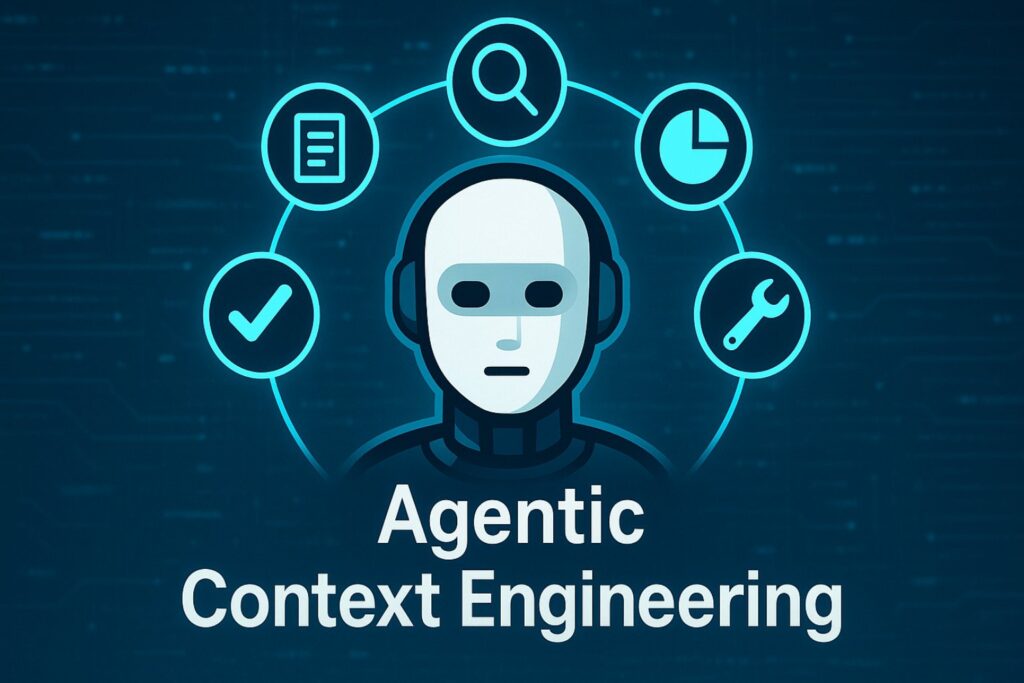
Robot surrounded by tools

Now let us step into something exciting. Agentic Context Engineering. Sounds complex, but do not worry, we will simplify it.

Before we talk about agentic context engineering, we must understand one simple word here: agentic. In AI, agentic means the ability to take action, not just give answers. So when we say AI agent, we are not talking about a new type of AI model. We are talking about a way of using AI models so they can think step by step, make decisions, use tools, and take actions to complete a goal.

A normal AI chatbot waits for your prompt and responds once. An AI agent, on the other hand, keeps working until the task is done. It can search the internet, look at files, call tools, plan steps, and even correct its own mistakes. For example, a chatbot can write one email. But an AI agent can manage your inbox, reply to messages, sort them, and schedule meetings.

Now let us connect this to context engineering. A simple chatbot only needs a prompt. But an AI agent needs evolving context, because it works in multiple steps. Every step creates new information. That new information must be added to the context so the agent knows what to do next.

Example of how an AI agent builds context step by step:

  1. Understands your goal
  2. Searches for information
  3. Reads data and extracts insights
  4. Plans the next step
  5. Executes a task
  6. Reviews results and improves

At every step, the agent updates its context. This is what we call agentic context engineering. It is still part of AI, not a separate technology. It is simply the method of managing context for AI agents so they can act intelligently across multiple steps, instead of just replying once.

This is a major step forward in AI automation and the future of how AI will work in real life.

The Building Blocks of Context Engineering
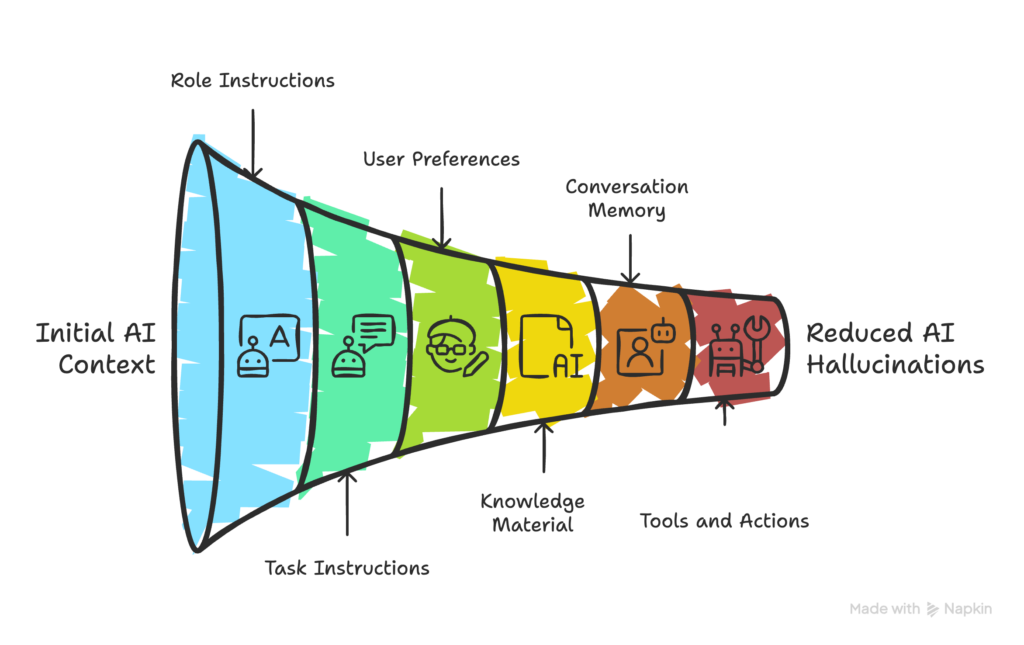
Funnel showing layered AI context building process

There is no strict formula or fixed structure for context engineering. Different people and teams do it in different ways. The goal is simple: give the AI everything it needs so it does not guess or hallucinate. Hallucination means when AI makes up wrong information. Context engineering reduces that by giving the AI real and relevant information.

To make it easy, think of context like layers that stack together to guide the AI. Here are the most common layers used:

1. Role or System Instructions

This sets the behavior of the AI. It tells the AI who it is supposed to be in this task.
Examples:

  • “You are a helpful business writing assistant.”
  • “Always give verified information and ask questions if something is unclear.”

2. Task Instructions

This explains the specific job you want done.
Example:

  • “Write a LinkedIn post about context engineering.”

3. User Preferences

This helps personalize the output so the AI matches your style.
Examples:

  • Tone: friendly, formal, bold
  • Format: short paragraphs, bullet points
  • Audience: beginners, professionals

4. Knowledge or Reference Material

This gives the AI facts so it does not hallucinate.
Examples:

  • Product details
  • Policy documents
  • Website links
  • Research notes

5. Conversation Memory

This keeps important details from earlier messages so the AI does not forget the context.
Examples:

  • “Earlier you said the article should be 2000 words.”
  • “Remember, my audience is beginners.”

6. Tools and Actions

This tells the AI what tools or functions it can use to complete the task. Modern AI models, including GPT-5, can even decide on their own when to use a tool.
Examples:

  • Web search
  • Deep Research
  • File reader

You do not need to use all six layers every time. But the more useful context you provide, the better and more reliable the AI becomes. That is the heart of context engineering – reduce confusion, remove guesswork, and prevent hallucinations.

How to Get Good at Context Engineering

Man giving task instructions to AI

Being good at context engineering is not about writing long prompts or using fancy templates. It is about thinking clearly. You need to understand what you want from the AI and then give it just enough information to do the job well. Here is how to get better at it, step by step, in a simple way.

1. Start with the output in mind

Do not rush to write a prompt. First, picture the final output you want. Is it a blog? A plan? A strategy? A code file? A customer email? Once you see the output clearly, you will know what information the AI needs to produce it. Work backwards from the goal.

2. Decide what context is necessary

Ask yourself: what does the AI need to know before it can do this well?

  • Does it need background info?
  • Does it need facts or data?
  • Does it need to follow a certain tone or style?
  • Does it need examples to copy?

Context engineering is about feeding only useful information. Not too little, not too much.

3. Gather the context

Once you know what is needed, bring the right information together. Different tasks need different context:

  • Sometimes quick context is enough. Example: adding two lines of background.
  • Sometimes you need web search context. Example: collecting fresh facts or stats.
  • Sometimes you need deep research context. Example: summarizing reports before starting.
  • Sometimes you need document context. Example: product manual, sales copy, company policy.

Choose the level of depth based on the task, not randomly.

4. Share context in a clean way

AI understands better when things are clear. You do not need complex templates. Just structure your message in a simple, readable way. You can separate details with short lines, bullet points, or numbered steps. Clarity improves output quality more than keyword tricks.

5. Give examples when needed

If you want the AI to follow a style, show a sample. Examples are powerful context. The AI will learn your tone, formatting, and level of detail instantly.

6. Guide the AI step by step

For bigger tasks, do not ask everything at once. Good context engineers break large goals into steps and add context gradually. Use follow up prompts like:

  • “Before we write, outline the structure.”
  • “Now expand this section.”
  • “Now refine tone and clarity.”

This makes results more accurate and consistent.

5 Real World Examples of Context Engineering

Below are five practical and detailed examples of context engineering for real-world tasks.

Example 1 – Customer Support Email Response

Scenario:
You received a long and frustrated email from a customer who did not receive their order. You want AI to write a polite response that feels human, understands the situation, and keeps the customer calm. If you just paste “Reply to this email,” the AI will write something basic. Here, we engineer context so it understands tone, situation, and business policy.

Context Engineered Prompt:

Task: Write a professional and empathetic customer support reply.

Customer Message:
"Hi, I ordered headphones 10 days ago and your website promised 3-5 day delivery. I still have not received anything. The tracking number does not work. This is terrible service. If I do not get a response, I want a refund."

Context:
- Customer is frustrated due to late shipping
- We must apologize politely and acknowledge delay
- Offer a clear next step: provide working tracking info and timeline
- Do not argue or blame logistics
- Keep message short and respectful

Output Requirements:
- Tone: calm, human, empathetic
- Length: 120–150 words
- Include a request for order ID if needed
- Mention realistic resolution time (24–48 hours)

Write the reply now.

Example 2 – LinkedIn Personal Bio Rewrite

Scenario:
You want a LinkedIn bio that sounds professional but not robotic. The AI must understand your background first, otherwise it will invent details or be too generic. So we provide context about you and how you want to sound.

Context Engineered Prompt:

Task: Rewrite my LinkedIn "About Me" bio to make it clear and professional.

My Background:
- 5 years experience in digital marketing
- Specialized in SEO and growth content
- Worked with SaaS startups
- Currently freelance consultant
- Help businesses grow organic traffic and inbound leads

Writing Style Preferences:
- Confident but not salesy
- Simple language
- No cliches like "results-driven professional"
- Write in first person
- Avoid buzzwords

Output Requirements:
- Length: 3 short paragraphs
- Add personality
- End with a clear call to connect

Now write the bio.

Example 3 – Business Strategy Plan

Scenario:
You want the AI to create a strategy plan for launching a new online course. Instead of a general response, context engineering helps produce structured and smart output.

Context Engineered Prompt:

Task: Create a launch strategy plan for an online course.

Course Details:
- Topic: Personal productivity for beginners
- Duration: 4-week course
- Format: Video lessons + worksheets + weekly Q&A
- Price: $99
- Target Audience: Freelancers, students, and young working professionals

Goal:
Sell the first 200 seats in 30 days

Provide:
- Marketing channels to use
- Content strategy
- Email launch sequence
- Promotion ideas
- Timeline

Output Format:
Organize response into sections:
1. Target Audience Breakdown
2. Unique Selling Points
3. 30-Day Launch Timeline
4. Marketing Funnel
5. Content Strategy (social + email)
6. Conversion Tactics
7. Final Action Checklist

Write the full strategy now.

Example 4 – YouTube Video Script Outline

Scenario:
You want to create a YouTube explainer video, but AI needs context about your audience, topic, and style before it can produce a good script outline.

Context Engineered Prompt:

Task: Create a YouTube video script outline.

Topic: "What is Context Engineering?"

Audience:
- Beginners
- No AI or technical background
- Curious about AI skills

Goals:
- Keep them engaged
- Educate simply
- Avoid technical jargon
- Use storytelling

Structure Requirements:
- Video length: 8 minutes
- Sections:
  1. Hook intro
  2. Breakdown of context simple
  3. Why it matters
  4. Real world examples
  5. Simple framework
  6. Call to action

Tone Guidelines:
- Conversational
- Friendly
- Easy to follow

Write the script outline now.

Example 5 – Research Summary with Citations

Scenario:
You want AI to summarize research but prevent hallucinations. So you include proper context instructions to force accuracy and clarity.

Context Engineered Prompt:

Task: Summarize key insights from real research studies about the impact of sleep on productivity.

Context:
- Only use real studies
- No guessing or making up data
- Cite sources clearly
- Show both positive and negative findings
- Keep it beginner friendly

Output Format:
- Section 1: Short summary paragraph
- Section 2: 5 key findings with bullet points
- Section 3: Real study references with links
- Section 4: Final practical tips

Tone:
- Educational but simple
- No complex science language

Start now.

Final Thoughts

Context engineering is not a complex trick. It is just clear thinking. You tell the AI what you want, why you want it, and what it needs to know before it answers. That is it. When you give better context, you get better results. No more guessing. No more weak answers. No more hallucinations.

So, this is the real future of working with AI. Not magic prompts. Not shortcuts. Just clarity. And anyone can do it. Including you.


15 Best AI Apps Every Student Should Use in 2026

If you are a student in 2026 and not using AI apps, you are honestly making studying harder than it needs to be. They are simple tools built to help students understand, learn faster, and save time.

In simple words, AI apps act like digital helpers. They explain topics, summarize notes, create quizzes, fix grammar mistakes, and save hours of effort. You do not need any technical background to use them. Most of these apps work just like chatting with a friend or clicking a button.

This article is written from personal experience and deep research. Everything shared here is student focused, practical, and easy to understand. If you have never used AI tools before, this guide will still make complete sense to you. By the end, you will clearly know which AI apps to use, how to use them, and why they matter.

Should School or College Students Use AI Apps?

Yes, students should use AI apps, but in the right way. AI apps are tools, not shortcuts for cheating. When used properly, they help students understand concepts better and manage time efficiently.

Many students struggle because they do not get instant help when they need it. AI apps solve this problem. They are available anytime. You can ask questions late at night, revise topics before exams, or clarify doubts instantly.

The key point is this. AI should help you learn, not think for you. When used responsibly, AI apps become personal tutors, note helpers, and study partners.

Benefits of Using AI Apps for Learning

AI apps bring many real benefits to students across subjects and education levels.

First, they save time. Tasks like summarizing notes, creating flashcards, or checking grammar take minutes instead of hours. That time can be used for revision or rest.

Second, they improve understanding. AI can break complex topics into simple explanations. You can ask follow-up questions without feeling embarrassed or rushed.

Third, they support different learning styles. Some students learn better by reading, some by listening, some by practice. AI apps cover all of these.

Fourth, they reduce stress. Knowing you have help available anytime makes studying feel less overwhelming.

Most importantly, AI apps help students take control of their own learning.

1. Google NotebookLM

NotebookLM AI tool summarizing and organizing study notes

My Personal Research and Study Assistant

Google NotebookLM is one of the most useful AI study tools I have used so far.
This app is built to help students understand their own study materials, not random internet content.
That is what makes it powerful and safe for learning.

What Google NotebookLM Actually Does

NotebookLM lets you upload your study content.
This can be PDFs, Google Docs, class notes, research papers, or lecture transcripts.
Once uploaded, the AI studies only those files.

This means every answer comes from your material, not outside guesses.

How I Use NotebookLM for Studying

I upload one chapter or one subject at a time.
Then I ask simple questions like “Explain this topic in easy words”.
It gives clear explanations using my notes only.

I also ask it to summarize long chapters.
It reduces 30 pages into a clean and readable summary.

Key Student Benefits

  • No distractions from irrelevant sources
  • Accurate answers based on your syllabus
  • Great for exam preparation and revision
  • Perfect for research-based subjects

Study Features That Matter

NotebookLM can create:

  • Summaries
  • Question and answer notes
  • Flashcards
  • Study guides

This saves hours of manual work.

Free and Paid Plan Explained

The free plan is very generous.

FeatureFree Plan
NotebooksUp to 100
Sources per notebookUp to 50
AI summariesIncluded
Q and AIncluded

Most students do not need the paid version.

Why I Recommend It

If you struggle with understanding textbooks or research papers, this tool feels like a private tutor.
It does not confuse you.
It explains exactly what you need to know.

Google NotebookLM is a must-have AI app for students who study from PDFs and notes.

2. Studley AI

Studley AI tutor helping students learn

The Most Complete AI Study Coach I Have Used

Studley AI feels like an all-in-one study partner.
It does not focus on just one thing.
It helps with studying, revision, quizzes, and homework help.

What Studley AI Is

Studley AI turns your learning material into interactive study content.
You upload notes, slides, videos, or articles.
The app converts them into flashcards, quizzes, and tests.

How Studley Helps Me Study Better

I upload my class notes before exams.
Studley creates practice questions automatically.
It tells me which topics I have mastered and which ones I have not.

This helps me study smart instead of studying everything again.

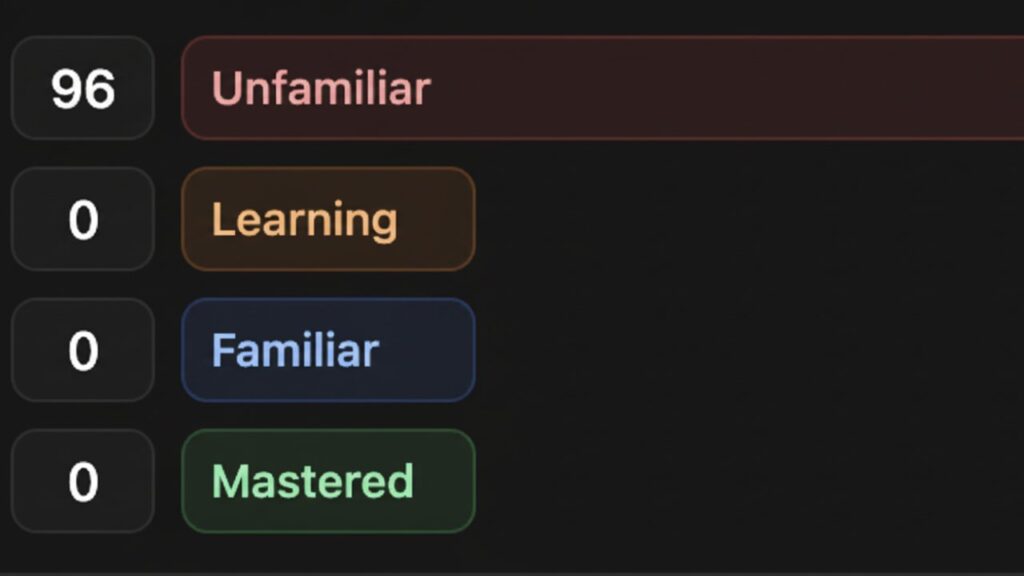
Unique Learning System

Studley tracks learning in four levels:

  • Unfamiliar
  • Learning
  • Familiar
  • Mastered

This makes progress visible and motivating.

Homework Help Feature

Studley allows you to take a photo of homework questions.
It explains the solution step by step.
It focuses on teaching, not just answering.

Student Benefits

  • Saves study time
  • Improves memory with repetition
  • Helps focus on weak areas
  • Great for exam preparation

Free vs Paid Plan

Studley offers a free daily plan.

PlanWhat You Get
FreeVery limited access
PaidUnlimited quizzes, tests, tutor mode

The paid plan is affordable and optional.

Why I Recommend It

Studley feels like a personal coach.
It adapts to your pace.
It is especially useful before exams.

One of the best AI apps for study and revision.

3. ChatGPT

ChatGPT AI assistant answering questions and generating helpful responses

The Most Versatile AI Tutor for Students

ChatGPT is the AI app most students already know.
But many students still do not use it correctly.

When used properly, ChatGPT becomes a 24/7 tutor.

What ChatGPT Does for Students

ChatGPT answers questions in simple language.
You can ask follow-up questions.
You can ask for examples and explanations.

It explains topics like a patient teacher.

How I Use ChatGPT for Learning

I ask ChatGPT to explain concepts I did not understand in class.
I ask it to simplify topics.
I also ask it to quiz me before exams.

Study Mode Is a Game Changer

ChatGPT now includes Study Mode.
This mode does not just give answers.

Instead:

  • It asks guiding questions
  • It explains step by step
  • It helps you think

This makes learning deeper.

Writing and Assignment Help

ChatGPT helps with:

  • Essay outlines
  • Idea brainstorming
  • Grammar improvement
  • Clarity suggestions

I use it to polish my writing, not replace it.

Free and Paid Access

ChatGPT has a strong free version.

PlanDetails
FreeBasic AI help
PlusAdvanced AI, faster responses

Most students are fine with the free version.

Why I Recommend It

ChatGPT is flexible.
It adapts to your questions.
It works for almost every subject.

One of the best AI learning apps for beginners.

4. Google Gemini

Google Gemini AI assistant generating creative and informative content

A Powerful AI Built into Google Tools

Google Gemini is Google’s advanced AI assistant.
It works with text, images, and documents.

This makes it very useful for students.

What Makes Gemini Different

Gemini understands images.
You can upload:

  • Homework photos
  • Notes
  • Diagrams

It explains what it sees.

How I Use Gemini

I upload messy notes.
Gemini summarizes them clearly.
I upload diagrams and ask it to explain them.

This helps visual learners a lot.

Research and Study Support

Gemini can:

  • Generate summaries
  • Create quizzes
  • Help with research

It works well with Google Docs and Drive.

Student-Friendly Access

Gemini has a free version.
Advanced features come with Google AI Pro.

Also, students often get discounts.

Why I Recommend It

If you already use Google products, Gemini fits naturally.
It feels like an extension of your study system.

Great for visual learning and research.

5. Brainly AI

Brainly homework help platform with AI-powered study solutions

Community Knowledge with AI Support

Brainly

Brainly combines AI with student knowledge.
It is especially helpful for homework questions.

How Brainly Works

Students ask questions.
AI and community members provide answers.

This creates multiple explanations.

How I Use Brainly

I use it when stuck on homework.
I read explanations, not just answers.

This helps me understand the logic.

AI Tutor and Test Prep

Brainly AI can:

  • Generate practice questions
  • Explain answers step by step

It encourages learning, not shortcuts.

Free and Paid Plan

Brainly is mostly free.

PlanBenefits
FreeBasic access
PlusNo ads, unlimited answers

Very affordable for students.

Why I Recommend It

Brainly is great for quick help.
The community makes explanations clearer.

Overall, a reliable AI app for homework help.

6. Claude

Claude AI assistant reading and understanding written content

The AI That Explains by Showing, Not Just Telling

Claude feels less like a chatbot and more like a smart study partner who actually shows how things work.
Instead of only explaining ideas in words, it often creates examples, mini demos, or simple models to make concepts clearer.
This makes learning feel practical and real, not theoretical.

What Makes Claude Stand Out for Students

Claude is especially good at breaking ideas into interactive examples.
If you are learning something abstract, Claude can turn it into a small simulation or example you can follow step by step.

For example, if someone is confused about how an algorithm works, Claude can write a small piece of code that shows how the logic runs.
You can see how values change, how decisions are made, and why the result looks the way it does.

How I Personally Use Claude

When I do not understand how a system works, I ask Claude to show it in action.
For subjects like computer science, economics, or logic-based topics, Claude creates simple working examples (with live preview) instead of long explanations.

If I am learning statistics, it can create a small example dataset and explain patterns using that data.
If I am learning programming, it can write short, readable code that demonstrates a concept clearly.

Learning Through Examples, Not Theory

Claude is great at:

  • Turning ideas into real-world style examples
  • Showing cause and effect clearly
  • Helping visualize processes step by step

This makes it easier to remember and apply what you learn later.

Free and Paid Access

Claude offers a solid free version with daily limits.

PlanWhat It Offers
FreeLimited daily access
ProHigher usage and faster access

Why Claude Feels Different

Claude focuses on learning by demonstration.
It helps you understand how things work, not just what they are.

For college students who learn better by seeing examples in action, Claude by Anthropic is one of the most effective AI apps available today.

7. Quizlet

Quizlet app illustration for studying with flashcards and quizzes

Smarter Flashcards and AI-Powered Practice

Quizlet has been part of student life for years.
But now, with AI features, it has become much more powerful.

It is no longer just flashcards.
It is a complete AI study assistant.

What Quizlet Does for Students

Quizlet helps you memorize and revise information.
You can create flashcards or use millions of ready-made ones.

With AI, Quizlet now helps you understand, not just memorize.

How I Use Quizlet

I upload my notes or paste text.
Quizlet turns them into flashcards automatically.

I then use practice tests and quizzes to revise.

AI Features That Matter

Quizlet includes:

  • AI tutor style chat
  • Automatic summaries
  • Practice tests
  • Question generation

The AI asks questions instead of just showing answers.

Learning Benefits

  • Improves memory
  • Makes revision interactive
  • Helps identify weak areas
  • Reduces exam stress

Free and Paid Plan

Quizlet has a useful free version.

PlanWhat You Get
FreeFlashcards, limited AI
PlusFull AI tools, expert solutions

The paid plan is optional but helpful during exams.

Why I Recommend It

Quizlet is perfect for revision.
It is simple, visual, and effective.

One of the best AI study apps for exam preparation.

8. Perplexity

Perplexity AI research assistant analyzing information with search tools

AI Search That Gives Clear Answers with Sources

Perplexity

Perplexity feels like a smarter version of Google.
Instead of links, it gives direct answers.

This is very helpful for students.

What Perplexity Does

You ask a question.
Perplexity gives a clear answer with sources.

This helps with research and assignments.

How I Use Perplexity

I use it when researching topics.
It saves time and avoids information overload.

I trust it more because it shows where information comes from.

Study and Research Benefits

  • Quick topic understanding
  • Reliable sources
  • Less confusion
  • Better research quality

It is especially useful for essays and projects.

Student-Friendly Features

Perplexity can:

  • Summarize topics
  • Answer follow-up questions
  • Help with study material

It works like a research assistant.

Free and Paid Plan

Perplexity has a strong free version.

PlanDetails
FreeBasic searches
ProAdvanced AI, more searches

Free plan is sufficient for most of the use cases.

Why I Recommend It

Perplexity helps you research faster.
It removes unnecessary noise.

9. Microsoft Copilot

Microsoft Copilot AI boosting productivity with smart digital assistance

Your Personal AI Assistant for Study, Work, and Daily Tasks

Microsoft Copilot is more than just an AI chatbot.
It is a personal AI assistant designed to help with learning, work, and daily tasks.

Copilot feels natural to use and understands context very well.

What Copilot Does

Copilot helps with:

  • Studying
  • Writing
  • Creating visuals
  • Learning through audio
  • Everyday planning

It adapts to what you need at that moment.

How I Use Copilot

I use Copilot to explain topics simply.
I also use it to create summaries and draft content.

It feels like talking to a smart assistant who understands my goal.

Visual AI with Mico

Copilot includes Mico, a visual AI assistant.
Mico uses expressions and visuals to make learning interactive.

This makes study sessions feel more engaging and less boring.

Smart Learning Features

Copilot includes built-in learning tools:

  • Flashcards for revision
  • Quiz mode to test understanding
  • Live learning with Mico
  • Study help adjusted to your pace

This makes it suitable for beginners.

Work and Study Productivity

Copilot helps you:

  • Draft emails and reports
  • Create presentations
  • Summarize information
  • Translate and proofread
  • Plan tasks and schedules

It saves time and reduces effort.

Voice Chat Support

You can talk to Copilot using voice.
This allows hands-free learning and idea brainstorming.

It feels natural and easy to use.

Why I Recommend It

Copilot makes tasks feel simpler.
It boosts confidence and creativity.

10. Canva

Canva AI design assistant creating visuals and presentations easily

Create Professional Designs Without Design Skills

Canva is one of the easiest design tools for students.
With AI features, it becomes even better.

You do not need design experience.

What Canva Helps With

Canva helps you create:

  • Presentations
  • Posters
  • Infographics
  • Reports

AI makes this faster and easier.

How I Use Canva

I use it for presentations and project visuals.
AI helps generate layouts and text ideas.

It makes my work look professional.

AI Features That Help Students

Canva AI can:

  • Generate text
  • Suggest designs
  • Create layouts automatically

This saves a lot of effort.

Learning and Presentation Benefits

  • Better visual learning
  • Clear communication
  • Higher quality projects

This is great for group assignments too.

Free and Paid Plan

Canva has a strong free version.

PlanFeatures
FreeTemplates, basic AI
ProFull AI tools, premium designs

Why I Recommend It

Canva makes learning visual.
It improves presentation quality instantly.

11. Otter AI

Otter.ai assistant transcribing meetings and spoken conversations

Never Miss a Lecture or Important Point Again

Otter.ai is one of the most helpful Artificial Intelligence tools for students who attend lectures.
It listens to spoken words and turns them into written notes.

This alone can reduce a lot of study stress.

What Otter.ai Does

Otter records lectures, meetings, or group discussions.
It converts speech into text in real time.

You get written notes automatically.

How I Use Otter.ai

I use Otter during live lectures.
Instead of writing everything, I listen carefully.

Later, I review the transcript and highlight key points.

Why This Helps Students

  • No fear of missing information
  • Better focus during class
  • Easy revision later

It feels like having a personal note-taker.

Smart Features That Matter

Otter can:

  • Identify speakers
  • Highlight important parts
  • Create short summaries

You can also search within notes.

Free and Paid Plan

Otter has a useful free version.

PlanWhat You Get
FreeLimited monthly minutes
ProMore recording time, advanced features

Students can use free version for selective classes.

Why I Recommend It

Otter is perfect for lecture-heavy courses.
It helps you review content accurately.

Altogether, a must-have AI app for school or college students who rely on lectures.

12. Speechify

Speechify AI converting text documents into spoken audio

Turn Reading into Listening and Save Time

Speechify converts written text into audio.
It reads documents out loud using natural voices.

This changes how students consume study material.

What Speechify Does

Speechify reads:

  • PDFs
  • Articles
  • Notes
  • Web pages

You listen instead of reading.

How I Use Speechify

I paste my notes into Speechify.
I listen while walking or resting.

This helps me revise without staring at screens.

Learning Benefits

  • Saves reading time
  • Reduces eye strain
  • Helps auditory learners

It turns idle time into study time.

AI Features Students Appreciate

Speechify allows:

  • Speed control
  • Voice selection
  • Scanning text from images

It also summarizes content in premium plans.

Free and Paid Plan

Speechify has a free option.

PlanDetails
FreeBasic voices, limited speed
PremiumNatural voices, fast speed, summaries

Free version is enough for light use.

Why I Recommend It

Speechify is great for revision.
It makes studying more flexible.

A super useful AI learning app for multitasking students.

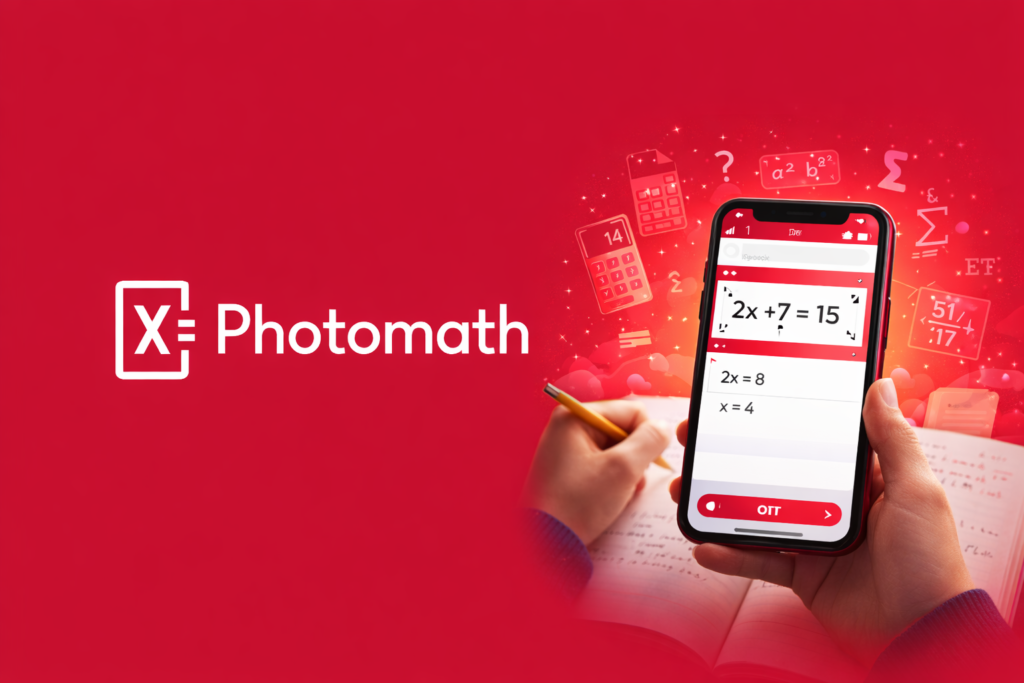
13. Photomath

Photomath app solving math equation using smartphone camera

Learn Math Step by Step Using Your Camera

Photomath is one of the most popular AI tools for math students.
It solves math problems using your phone camera.

More importantly, it explains every step.

What Photomath Does

You scan a math problem.
Photomath shows the solution.

It also explains how the answer is reached.

How I Use Photomath

I try solving problems myself first.
Then I scan them to check my steps.

This helps me understand mistakes.

Subjects It Covers

Photomath works for:

  • Arithmetic
  • Algebra
  • Geometry
  • Calculus

It supports both printed and handwritten problems.

Learning Benefits

  • Improves problem-solving skills
  • Builds confidence in math
  • Reduces frustration

It is a learning tool, not just an answer tool.

Free and Paid Plan

Photomath offers strong free access.

PlanFeatures
FreeStep-by-step solutions
PlusExtra explanations, more methods

Most students can rely on the free version.

Why I Recommend It

Photomath explains math clearly.
It makes difficult problems manageable.

One of the best AI apps for homework help in math.

14. Grammarly & Quillbot

Grammarly and QuillBot logos representing AI writing assistants

Write Clearly, Confidently, and Correctly

Grammarly and QuillBot are powerful writing tools.
They help students improve writing quality.

I often use both together.

What Grammarly Does

Grammarly checks:

  • Grammar
  • Spelling
  • Sentence clarity
  • Tone

It works while you write.

What QuillBot Does

QuillBot helps with:

  • Paraphrasing
  • Rewriting sentences
  • Summarizing text

It improves flow and readability.

How I Use Them

I write my assignment first.
Then I use Grammarly to correct mistakes.

I use QuillBot to rewrite unclear sentences.

Student Benefits

  • Better essays
  • Fewer grammar mistakes
  • Clearer ideas

They help you learn from corrections.

Free and Paid Plans

Both tools offer free versions.

ToolFree UsePaid Benefits
GrammarlyBasic checksAdvanced suggestions
QuillBotLimited paraphrasingFull modes, longer text

Free versions are enough for basic needs.

Why I Recommend Them

They improve writing quality fast.
They are essential for assignments.

Must-have AI tools for students who write often.

15. Notion (with Notion AI)

Notion AI assistant helping students organize notes and ideas

Organize Your Entire Study Life in One Place

Notion

Notion is more than a notes app.
It is a complete organization system for students.

With AI, it becomes even smarter.

What Notion Does

Notion helps you:

  • Take notes
  • Plan tasks
  • Track assignments
  • Store study material

Everything stays organized.

What Notion AI Adds

Notion AI can:

  • Summarize notes
  • Rewrite content
  • Create outlines
  • Improve clarity

It works inside your notes.

How I Use Notion

I store all my class notes in Notion.
I use AI to summarize long pages.

This saves revision time.

Why Students Love It

  • Keeps everything in one place
  • Reduces clutter
  • Improves focus

It feels like a digital study planner.

Free and Paid Access

Notion itself is free for students.
Notion AI has limited free access.

Paid plans unlock more AI usage.

Why I Recommend It

Notion helps manage academic life.
AI makes notes more useful.

FAQs – Common Questions Students Have About AI Study Apps

Are AI apps actually useful for students?

Yes, AI apps are genuinely useful when used the right way.
They help students understand topics faster and with less stress.
Instead of feeling stuck, you get instant explanations and guidance.

AI apps do not replace learning.
They support learning by making concepts clearer and study time more efficient.

Can students with zero AI knowledge use these apps?

Absolutely yes.
All the AI apps discussed in this article are built for beginners.
You do not need any technical knowledge to use them.

Most apps work by simply typing a question, uploading notes, or clicking a button.
If you can use a smartphone or laptop, you can use these apps easily.

Will using AI tools make students lazy?

Only if they are misused.
When used properly, AI apps actually improve learning habits.

Students who use AI to understand concepts, revise better, and practice more often become more confident and independent learners.
Problems arise only when students copy answers without learning.

Is it safe to use AI apps for school and college work?

Yes, it is safe as long as you follow academic rules.
Using AI for explanations, summaries, grammar checks, and practice is widely accepted.

You should avoid submitting AI-generated content as your own final work unless your institution allows it.
Always treat AI as a helper, not a shortcut.

Do students need to pay for AI apps?

Not necessarily.
Most AI apps mentioned in this article offer strong free versions.

Free plans are enough for:

  • Daily studying
  • Homework help
  • Revision
  • Note organization

Paid plans are optional and useful only if you need advanced features or heavy usage.

Which type of student benefits the most from AI apps?

Almost every student can benefit, but especially:

  • Students who struggle with understanding concepts
  • Students preparing for exams
  • Students with heavy reading or writing workloads
  • Students who want better organization

AI adapts to your pace, which is something traditional learning often cannot do.

Can AI apps help with exam preparation?

Yes, very effectively.
Many AI apps create practice questions, summaries, and revision notes.

They help identify weak areas and focus revision where it matters most.
This makes exam preparation more targeted and less overwhelming.

Will AI-powered apps replace teachers in the future?

No.
AI apps cannot replace human teachers.

Teachers guide, inspire, and understand students emotionally.
AI tools only support learning by offering extra help outside class hours.

The best learning happens when teachers and AI tools work together.

How should students start using AI-powered apps without feeling overwhelmed?

Start small.
Pick one app based on your biggest problem.

If you struggle with notes, try Otter or Notion.
If you struggle with understanding, try ChatGPT or Claude.
If you struggle with revision, try Quizlet or Studley.

Once comfortable, slowly add more tools.

Final Thought for Students

AI apps are not magic.
But when used correctly, they make learning simpler, calmer, and more effective.

The goal is not to study more hours.
The goal is to study smarter.

If you treat AI as a learning partner, not a shortcut, it can completely change how you learn.

AI Fiesta Review: After the Update, Is It Worth in 2026?

0

AI Fiesta has been getting a lot of attention lately, and the reason is simple. It was launched by Dhruv Rathee along with the team behind TagMango, and they claimed it’s the world’s first platform to bring all major AI models into one place. Bold claims naturally invite both curiosity and criticism, and AI Fiesta got plenty of both. After launch, many users shared complaints online about its value, the quality of results, and whether it’s even worth paying for. So I decided to test it myself and write a no-nonsense AI Fiesta review that tells you exactly what works and what doesn’t.

I personally use multiple AI tools every single day. I enjoy testing them not just for fun, but also to understand which tool works best for which task. When I heard about AI Fiesta, it seemed like something that could reduce my effort by combining several AI models in one dashboard. That sounded useful, but only if it actually performed well. So this review is based on real usage and not just marketing promises.

With this post, my aim is to give you a complete review so you don’t have to search anything later. Stick with me till the end and you’ll get a clear answer on whether AI Fiesta is worth your money or not.

What Exactly Is AI Fiesta

Intro screen asking what is Fiesta AI

AI Fiesta is an AI tool bundle started by popular YouTuber Dhruv Rathee in partnership with TagMango. It launched as a subscription platform where users can access many paid AI models with one single plan. Instead of buying each AI tool separately, AI Fiesta acts like a hub where you get one combined dashboard to use them all.

The idea sounds smart and simple on paper. Instead of going to ChatGPT website, then Gemini, then Claude, then Grok, you get one chat window. You type your prompt once, and AI Fiesta sends it to all the connected AI models. You get responses from each of them side by side in one place.

The platform markets itself heavily as a time saver and a price saver. It claims that you can compare responses from the best AI tools. It also claims that you get more control and more flexibility. But claims are claims. Reality often looks different once you start using a tool.

The Main Selling Point Of AI Fiesta

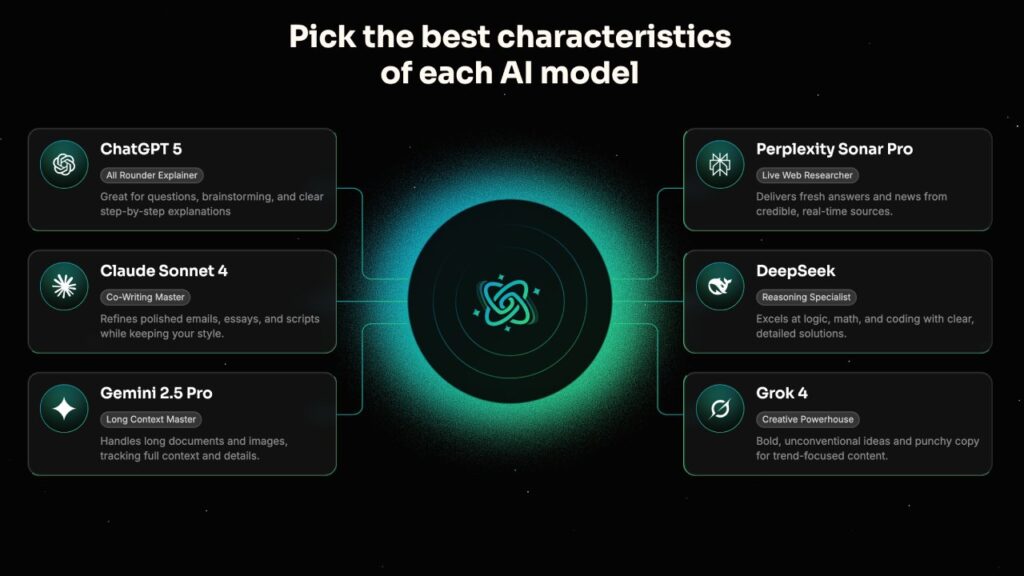
AI models with unique strengths and capabilities

The biggest promise of AI Fiesta is simple. One platform. Multiple models. One subscription. No credit card issues. No switching tabs. One combined experience.

AI Fiesta currently gives access to multiple AI models from one place. That includes top AI models like GPT, Claude, Gemini and others. It uses their official APIs. That means it is not generating answers from scratch. It sends your prompt to these AI models and show whatever each one replies.

That is the real engine behind AI Fiesta. It is not a new AI model. It is not some breakthrough technology. It is simply a platform built over existing tools through API connections. This also means that your output quality fully depends on those original AI models.

Super Fiesta Mode: A Cool Feature That Picks the Best AI for You

One of the newest features is called Super Fiesta.

It’s basically an automatic mode that chooses the best AI model for your query. So if you’re not sure whether Claude or ChatGPT is better for your task, Super Fiesta decides for you.
This makes the experience smoother. You don’t have to think about which model to choose every time. It gives you an answer based on what fits best — though, of course, it’s still AI doing its best guesswork.

Behind the scenes, it’s just smart tool switching using APIs. But as a user, it feels easy and smart.

Using Multiple Models at Once: Good for Testing

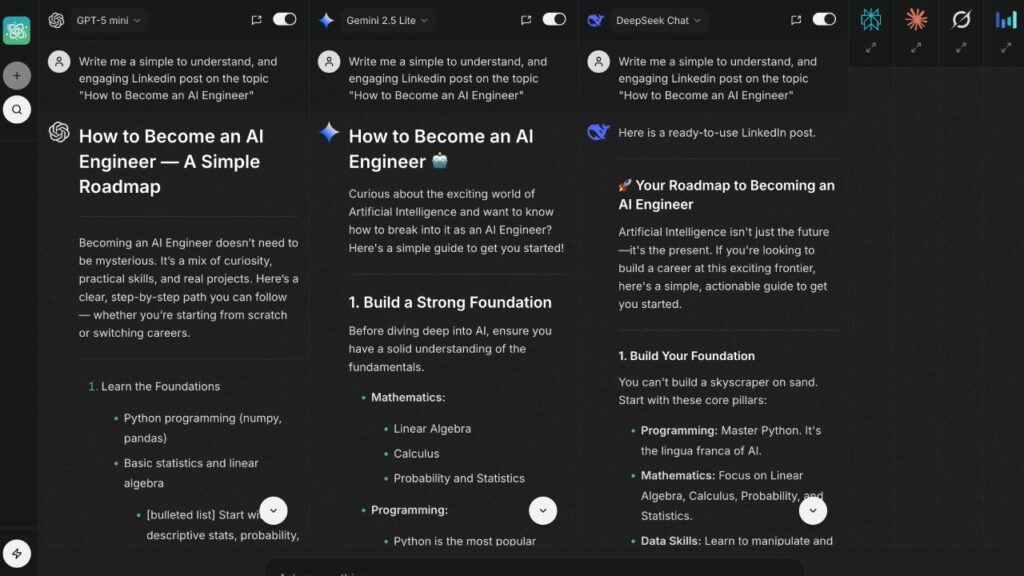
Comparison of AI models writing LinkedIn posts

Another thing I liked is how you can get responses from several AIs at the same time.

Let’s say I ask, “Write me a 7-day meal plan for weight loss.” I instantly get different answers from Claude, ChatGPT, Gemini, etc., side by side.

Each answer has a different tone, format, and level of detail. I can then compare and decide which one suits me.

This is perfect if you’re testing tools or just curious to know which model does what better. Instead of copying the same prompt across 5 tabs, AI Fiesta saves that effort.

The Avatar Feature: Nice Touch for Personalization

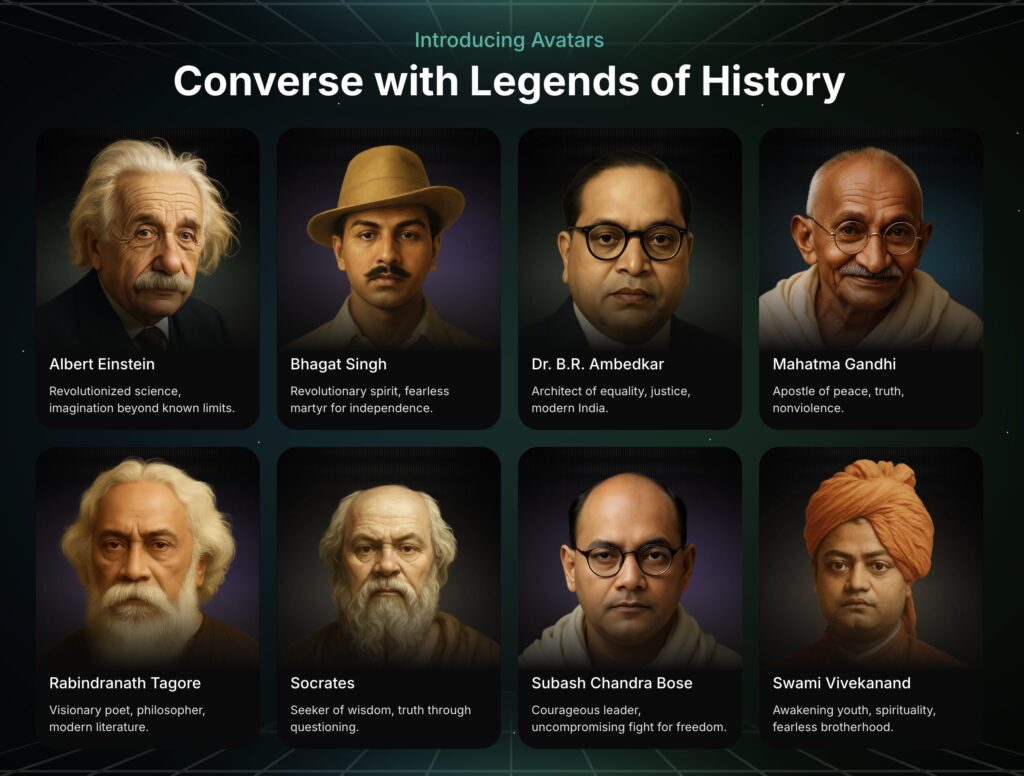
Historical legends available for interactive conversations

AI Fiesta comes with a ready-made Avatar system instead of letting you create one from scratch. You can choose from expert avatars like a Career Coach, Fitness Coach, Finance Advisor, Personal Doctor, or even historical figures like Albert Einstein, Mahatma Gandhi, and more.

When you select one of the expert avatars, it asks a few questions to understand your background and get context before starting the chat. This helps the AI tailor its advice to your needs — for example, giving fitness tips based on your health details or financial suggestions based on your goals.

It’s quite similar to the custom GPTs in ChatGPT, where you can set specific instructions about who you are and how you want the AI to respond. The Avatar feature isn’t a new innovation since you can get the same effect by simply telling a custom GPT to act like a certain personality.

However, for those who don’t want the extra work of writing detailed setup prompts, this feature is convenient. I tried chatting with a couple of the avatars, and the responses were well-aligned with their personalities.

Prompt Enhancement Feature: Expands Your Inputs

There’s a prompt enhancer tool built into AI Fiesta. If your prompt is unclear or full of typos, it cleans it up or adds more detail to make it clearer.

Let’s say I type something rough like “give marketing ideas travel vlog.” With one click, the enhancer turns it into “Provide 10 creative marketing ideas for a travel vlogging channel.”

This can be handy if you don’t know how to write good prompts. But again, most AI tools can do this if you just ask them to “fix or expand my prompt.”

So, it’s helpful, but not unique.

Pricing: ₹999 Feels Reasonable Until You Compare

AI Fiesta currently costs ₹999 per month, or ₹9999 (or less with discount) per year.

This includes access to all six AI models, Super Fiesta, avatars, image generation, and more. You also get 3 million tokens per month, which is a big bump from the earlier limit of 400,000.

The tokens are used whenever you send messages. If you use all models together, you use up more tokens. So the more you chat, the more tokens get consumed.

While 3 million sounds like a lot, if you’re using 4-5 models for every query, they can add up. It’s generous, but not unlimited.

But the biggest catch is that the 3 million tokens limit applies only to standard models. If you switch to premium ones like GPT-5, Gemini 2.5 Pro, or others, they consume four times more tokens, bringing your monthly limit down to 750,000 tokens.

They also give a free “Prompt Book” with thousands of ready-made prompts. Good for reference, but you’ll still need to context engineer most of them to suit your task and expected results.

One More Thing About Quality

Don’t expect the responses you get on AI Fiesta to be better than what you get from the original platforms. Fiesta doesn’t make the AIs smarter. It just sends your query to the original tools and fetches their response.

So if ChatGPT gives a wrong answer, it’ll be wrong here too. Same with Claude or Gemini. Fiesta doesn’t control the quality, it just simplifies how you access them.

How It Compares with ChatGPT Go

Title screen showing AI Fiesta versus ChatGPT Go

Just as AI Fiesta launched, OpenAI rolled out ChatGPT Go in India for ₹399 per month.

And this changes the game.

With ChatGPT Go, you get image generation, voice chats, deep research, file uploads, and even custom GPTs — all at less than half the price.

Yes, it’s just one AI model, not six. But ChatGPT is powerful and often good enough for most serious work.

And you don’t have to worry about token limits the way you do on AI Fiesta.

So, unless you’re testing or comparing multiple AI models regularly, ChatGPT Go gives more value for your money.

Is It Really Better Than Using Individual AI Tools?

AI Fiesta graphic listing Claude Gemini ChatGPT Deepseek

Not necessarily. AI Fiesta is more about saving time and reducing effort.

The answers you get are still from the original AI models. Fiesta isn’t improving them. It’s just packaging them together.

So if a model gives an incorrect answer, that problem still exists here.

What AI Fiesta really does is reduce friction. You don’t need five tabs open. You don’t need to retype your prompt every time. And that convenience is real.

But for actual productive work, especially if you care about accuracy and depth, I still prefer going to the individual tools.

Where It Works Best

Here’s where I think AI Fiesta makes sense:

  • If you’re testing which AI works best for your tasks
  • If you want to quickly compare different models’ styles
  • If you’re learning how AI tools work and want to explore
  • If you’re casually playing with AI and want convenience

But for deep writing, coding, research, or tasks that need high reliability, I’d stick with individual models like ChatGPT or Claude.

They’re more stable and often better integrated.

What’s Good About It

  • Super easy to compare different AI models
  • Smooth interface and quick responses
  • Avatar context setup makes conversations feel personal
  • Prompt enhancer helps beginners
  • Good for students, casual users, and testers

What’s Not So Great

  • Higher cost compared to ChatGPT Go
  • It doesn’t improve the quality of AI responses
  • Some features can be done manually in other tools
  • Limited free plan (only 3 messages)
  • Token system can be confusing

Final Thoughts: My Rating and Recommendation

AI Fiesta feels like a great concept, and for some people, it might be useful.

It brings together top AI tools in one clean setup, adds handy touches like avatars and prompt enhancers, and reduces the effort of switching between apps.

But it doesn’t offer anything you can’t already do with a bit of extra work. You can create avatars, tweak prompts, and test models on your own if you’re comfortable using other AI platforms.

For daily productivity, serious projects, or deep research, I still prefer tools like ChatGPT Go. It’s more affordable, more capable, and better equipped for real tasks.

So here’s my final verdict:

AI Fiesta gets a 3 out of 5. [⭐⭐⭐☆☆]

It’s great for casual use, side-by-side comparisons, or exploring how different AIs respond. But if you want long term value, stronger features, and consistent performance, you might want to look elsewhere.

Still, it’s a fun tool to have around for light testing and AI experiments. Just make sure your expectations are based on what it actually offers — ease of access and a smoother experience, not something entirely new.

10 Smart Ways to Use Your Free ChatGPT Go Access in India

If you’re in India, there’s some exciting news. OpenAI has rolled out ChatGPT Go free for one year, and it’s honestly a huge deal. I’ve been using ChatGPT daily, and this new update makes advanced AI tools accessible to everyone — students, professionals, and creators alike.

ChatGPT Go is like the upgraded version of the regular ChatGPT. It gives you faster replies, smarter reasoning, and the ability to generate images, summarize PDFs, and even talk to it through voice mode. Basically, it’s ChatGPT on steroids, but still easy to use.

The best part is that you can claim your ChatGPT Go free for 12 months in just a few clicks. Log in to ChatGPT, go to “Try Go,” and you’ll see the “Upgrade to Go” option. Select it, subscribe, and boom, you’re all set for a full year of free premium AI access.

Now, let’s talk about the fun part — how to actually use ChatGPT Go to get things done. Here, I’ll share ten smart ways you can use it to automate everyday tasks, boost productivity, and save hours of effort with 50 prompt examples you can try right away.

What Does the Free ChatGPT Go Plan Offer? (All Features Explained)

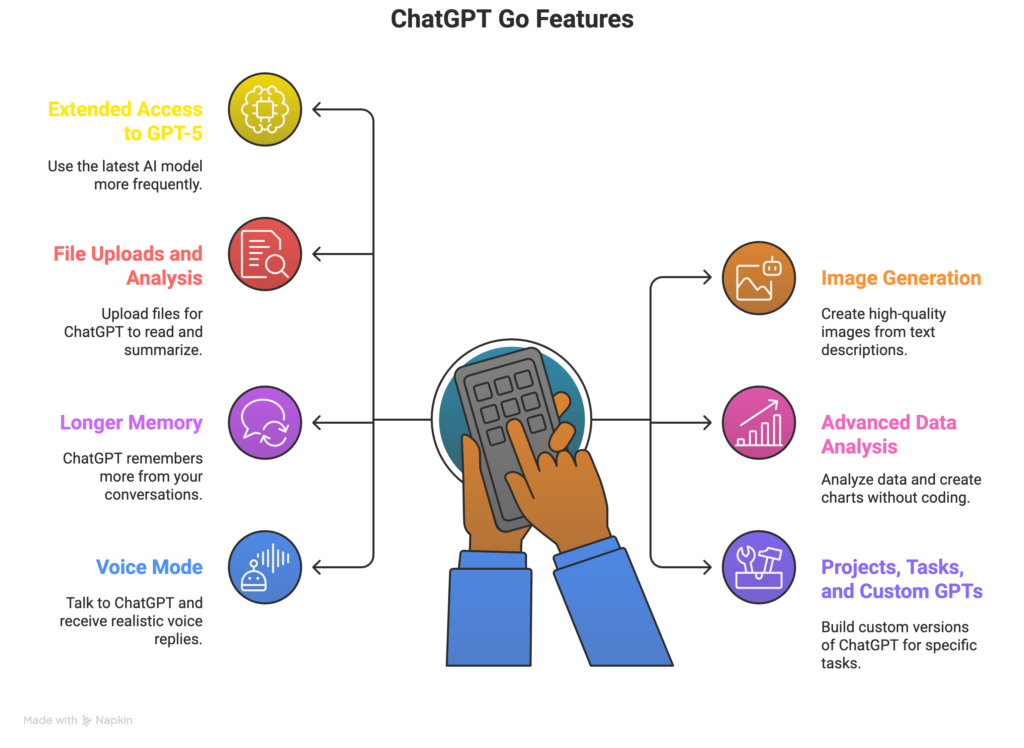
Infographic showing key ChatGPT Go features and tools

You might be wondering what extra benefits you get with ChatGPT Go compared to the regular free version.
Here’s a simple and clear breakdown of what makes it better:

1. Extended Access to GPT-5 (Latest Model)

GPT-5 is the newest and smartest version of the AI model that powers ChatGPT.
It understands complex questions better and gives more accurate answers.
With the free ChatGPT Go subscription, you can use GPT-5 more frequently and for longer conversations.
This means you get faster, smarter, and more detailed responses every time you chat.

2. Image Generation

ChatGPT Go lets you create high-quality, photo-realistic images by simply describing what you need.
It’s perfect for creators and marketers who want quick visuals.
For example, you can say:

Create an Instagram campaign image for XYZ clothing brand with bright colors, bold text saying "New Winter Collection," and a modern, photo-realistic background.

Within seconds, you get a ready-to-use image for your campaign or presentation.

3. File Uploads and Analysis

You can upload PDFs, Word files, or spreadsheets, and ChatGPT Go will read and summarize them for you.
It’s incredibly helpful when you don’t have time to go through lengthy reports or study materials.
You can also ask it to extract specific details or prepare short summaries for quick reviews.

4. Advanced Data Analysis

This feature helps you when you’re working with data or numbers.
You don’t need any coding skills — ChatGPT handles the math and creates charts or insights for you.
It can analyze sales data, calculate averages, or spot trends in your reports.
It’s like having a personal data assistant that saves hours of manual work.

5. Longer Memory (Extended Context)

ChatGPT Go can remember more from your conversations.
In the free version, long chats often lose track, but Go stays consistent.
You can discuss multiple topics, upload documents, and refer back to old points without it forgetting.
That means smoother, more connected conversations every time.

6. Projects, Tasks, and Custom GPTs

This feature lets you build your own mini versions of ChatGPT, called Custom GPTs.
You don’t need coding — just simple instructions.
You can make one for travel planning, tutoring, or customer support, and organize all your projects in one place.
It’s like having a set of smart personal assistants for different needs.

7. Voice Mode

You can talk to ChatGPT naturally and it will reply in a realistic voice.
This is great for practicing English, learning pronunciation, or having hands-free conversations.
You simply speak instead of typing, and it feels like chatting with a real person.

Each of these features opens up new ways to work, learn, and create.
Whether you’re a student, a content creator, or a working professional, ChatGPT Go helps you save time, stay creative, and simplify everyday tasks.
Next, let’s explore the best ways to make the most of your ChatGPT Go free access in India, along with examples and prompts you can try.

10 Smart Ways to Use Your Free ChatGPT Go Access

Text promoting task automation using free plan of ChatGPT Go

I’ve spent months using it for work, study, and daily tasks — and these are the smartest ways I’ve found to get real value out of it. Let’s start with the first one.

1. Turn Raw Data into Presentations Instantly

ChatGPT Go can turn complex or messy data into clean, understandable presentations in seconds. It’s perfect when there’s no time to manually analyze spreadsheets or design slides.

Who it’s for: Students, business analysts, marketing teams, and managers who prepare weekly or monthly presentations.

Prompt Examples:

Task: Sales Data Analysis and Presentation

I’ve uploaded an Excel sheet that includes sales data for three product categories over the past 12 months.  
I want to create a short presentation with three slides:
1. Overall performance overview
2. Product-wise trend comparison
3. Key insights and next steps  
Please summarize the data, mention noticeable patterns, and suggest slide titles and bullet points in a simple, presentation-ready format.

Task: Student Feedback Summary

I have a CSV file containing results from a student feedback survey with ratings for 10 subjects.  
Help me design a short presentation that I can use in a classroom discussion.  
Make one slide about the overall average score, one slide highlighting the highest and lowest-rated subjects, and one slide showing possible improvements.  
Keep the tone conversational but professional.

Task: Marketing Campaign Performance Review

I’m preparing a monthly report for a marketing campaign.  
The dataset shows impressions, clicks, and conversion rates across five platforms.  
Please extract three major insights, recommend how to present them visually, and create a 4-slide outline titled “Campaign Performance Review.”  
Each slide should have a heading, 3 bullet points, and a one-line conclusion.

Task: Attendance Summary for HR Meeting

I’ve uploaded an Excel file of employee attendance records for four departments.  
Please analyze the data and prepare a short 3-slide summary:
1. Department-wise attendance overview
2. Peak absenteeism periods
3. Suggestions for HR interventions  
Keep it simple and structured so I can present it in a meeting.

Task: Business Financial Overview Presentation

This spreadsheet contains expense and revenue details for our small business over six months.  
Please analyze profit margins, highlight the most profitable month, and suggest a simple 3-slide presentation outline for an investor update.  
Include one suggestion for a graph or chart on each slide.

2. Generate Creative Content — Images, Stories, or Posts

ChatGPT Go can write engaging posts, craft stories, and even design image ideas with a simple prompt. It’s a complete creative partner for anyone building a brand or expressing ideas.

Who it’s for: Creators, marketers, entrepreneurs, teachers, and freelancers who need consistent, high-quality content.

Prompt Examples:

Task: Social Media Caption for Product Launch

I’m working on an Instagram post for a new organic skincare brand.  
Write a short, friendly caption that introduces our new aloe vera gel.  
Add 5 suitable hashtags and a visual idea for an AI-generated image showing natural skincare products on a wooden background in daylight.  
Keep the tone warm, authentic, and easy to connect with.

Task: Blog Introduction for Travel Article

I’m creating a blog post for a travel website about unexplored destinations in Himachal Pradesh.  
Write an attention-grabbing opening paragraph (about 80 words) that paints a visual picture for readers.  
Also, provide a creative headline and one detailed text prompt that can be used to generate a scenic banner image of snow-covered mountains and peaceful villages.

Task: Café Promotion Post

I’m promoting a café’s special weekend offer for “Buy 1 Get 1 Free” coffee.  
Write an engaging social media post that sounds casual and inviting.  
Include emojis, a friendly call-to-action, 4 hashtags, and a short description prompt for an image showing two coffee mugs on a cozy café table.

Task: Motivational Short Story

I’m writing a short motivational story for an online publication.  
Create a story of about 150 words about a student who fails repeatedly but succeeds through persistence.  
Include a title suggestion and a short image prompt to create an illustration that fits the theme of determination and growth.

Task: Product Announcement for LinkedIn

I’m preparing a LinkedIn post introducing a new product feature for a tech startup.  
The tone should be professional yet approachable.  
Write a 120-word post that highlights the benefit, adds a closing line inviting feedback, and suggest a clean image prompt suitable for LinkedIn branding.

3. Create Full Project Reports or Professional Documents

With ChatGPT Go, creating structured, well-written reports takes minutes instead of hours. It can expand your notes into complete, formatted documents with headings, sections, and smooth flow.

Who it’s for: Students, consultants, project leads, and business writers.

Prompt Examples:

Task: Renewable Energy Project Report

I have research data and notes about renewable energy growth in India.  
Please turn them into a formal project report with these sections:
1. Introduction  
2. Solar Energy Adoption  
3. Wind Energy Progress  
4. Key Challenges  
5. Conclusion  
Keep the language simple and formal, suitable for a college-level project report.

Task: Business Proposal Draft

I’m preparing a business proposal for a website redesign project.  
The key points are: outdated design, need for better user experience, timeline of 6 weeks, and an estimated cost of ₹50,000.  
Please convert these into a professional proposal document divided into sections — Introduction, Objectives, Timeline, Cost, and Recommendations — written in clear and formal tone.

Task: Internship Report

I’ve completed a 2-month internship in digital marketing and need to write an internship report.  
Please summarize my key learnings, major tasks, and outcomes into a well-structured report.  
Divide it into three main parts: Introduction, Work Summary, and Key Takeaways.  
Keep the language simple and reflective.

Task: Environmental Project Report

I’m working on a project about waste management in urban areas.  
Create a detailed 1000-word report covering causes, existing issues, current policies, and innovative solutions.  
Include subheadings, short paragraphs, and a final recommendation section that proposes 2 actionable ideas.

Task: Customer Survey Summary Report

I’ve gathered 100 responses from a customer satisfaction survey.  
Write a short report summarizing main patterns in satisfaction, key complaints, and improvement areas.  
Use clear bullet points and end with a “Recommendations” section suggesting 3 ways to improve customer experience.

4. Write and Edit Emails Professionally

ChatGPT Go can instantly transform rough or unclear emails into polished, confident messages. It helps maintain the right tone for every situation — whether formal, polite, or friendly.

Who it’s for: Job seekers, employees, entrepreneurs, and freelancers.

Prompt Examples:

Task: Delay Notification Email

I need to write an email to my manager, Mr. Arora, explaining that the weekly report will be delayed by two days due to a technical issue.  
Please make the message polite, professional, and concise.  
Add a subject line, short apology, and closing note assuring that the report will be delivered promptly once the issue is resolved.

Task: Client Follow-Up Email

I’m following up on a proposal I sent to a client 10 days ago.  
Please write a professional follow-up email that sounds friendly and encourages a reply without sounding pushy.  
Include a short subject line and one polite reminder sentence in the closing.

Task: Recommendation Letter Request

I need to request a recommendation letter from my professor for a scholarship.  
Please write a respectful and concise email explaining what the scholarship is for and mentioning that the deadline is next week.  
Add a short thank-you sentence at the end.

Task: Investor Appreciation Email

I met with investors last week to discuss our startup’s progress.  
Write a short thank-you email summarizing 2 key points from the meeting and expressing appreciation for their time and guidance.  
Include a polite closing and an optional line about sharing the next update soon.

Task: Leave Request Email

I want to apply for two days of leave next week to attend a family event.  
Write a formal leave request email addressed to the HR team mentioning the exact dates and a short reason.  
Keep the tone professional and concise, and include a subject line.

5. Learn Complex Concepts in Simple English

ChatGPT Go can act like a personal tutor, breaking down difficult ideas into easy explanations. It can simplify complex topics, create examples, and even quiz you for practice.

Who it’s for: Students, lifelong learners, and competitive exam aspirants.

Prompt Examples:

Task: Economics Concept Simplified

I’m studying economics and struggling to understand inflation.  
Please explain the concept in very simple English, as if teaching a school student.  
Use a real-world example to show how rising prices affect purchasing power and include a short 3-sentence summary for revision.

Task: History Practice Questions

I’m preparing for competitive exams and want practice questions about the Indian freedom movement.  
Please create 10 multiple-choice questions with 4 options each, correct answers, and short one-line explanations.  
Keep the difficulty moderate and focus on major events between 1857 and 1947.

Task: Computer Basics Explanation

I’m learning about computer basics and want to understand what cloud storage means.  
Explain it in simple terms using an example of storing photos online.  
Also include one benefit and one possible risk in plain language for beginners.

Task: Artificial Intelligence Made Simple

I want to understand artificial intelligence without technical words.  
Please explain it like you’re teaching a teenager, using examples such as voice assistants or online recommendations.  
Keep it friendly, short, and easy to follow.

Task: Biology Concept Explanation

I’m preparing for a biology test and need help understanding photosynthesis.  
Explain the process step-by-step in plain English, describe what happens in sunlight, and include a short summary for quick revision notes.

6. Practice English Speaking with Voice Mode

ChatGPT Go’s voice mode lets anyone practice English conversation naturally. You can speak directly and get instant spoken feedback, which makes it excellent for fluency and pronunciation improvement.

Who it’s for: Students, professionals, job seekers, and anyone wanting to improve spoken English confidence.

Prompt Examples:

Task: Daily Conversation Practice

Let’s have a spoken conversation in English for 10 minutes.  
Ask me general questions about my day and gently correct my grammar whenever I make a mistake.  
After each correction, explain the right sentence in one line so I can learn faster.  
Keep the tone friendly and encouraging throughout.

Task: Interview Practice

I want to prepare for a job interview for the position of marketing executive.  
Ask me common interview questions one by one and wait for my spoken answers.  
After each response, share feedback on my word choice, grammar, and tone of confidence.  
At the end, summarize three areas I should improve.

Task: Roleplay for Customer Interaction

Pretend I’m a customer service executive speaking with a client who received the wrong order.  
Let’s practice this situation in voice mode.  
Ask me what happened, let me respond, then guide me on how to phrase my reply more politely or professionally.  
Keep your responses short so I can speak more.

Task: Pronunciation Practice

Help me practice pronunciation of commonly mispronounced English words like “schedule,” “entrepreneur,” “comfortable,” and “thorough.”  
Say each word slowly, ask me to repeat it, and tell me if I got it right.  
If I make a mistake, provide a simple tip to correct it.

Task: Confidence Building Chat

Let’s have a friendly voice chat about my favorite hobby — reading books.  
Ask me follow-up questions to keep the conversation natural.  
Whenever I pause too long or sound unsure, encourage me to continue and share one short confidence-building phrase.

7. Summarize Long Documents or PDFs

ChatGPT Go can read, understand, and summarize long PDFs, Word documents, or even copied text. It’s perfect for getting the essence of long reports without reading everything.

Who it’s for: Students, journalists, researchers, and corporate employees handling large files or reports.

Prompt Examples:

Task: Policy Document Summary

I’ve uploaded a 60-page PDF about India’s new education policy.  
Please summarize it into 10 key bullet points that highlight the main reforms, focus areas, and outcomes.  
Write in simple, clear English that’s easy to present in a classroom discussion.

Task: Academic Paper Overview

I’ve uploaded a research paper about climate change effects on agriculture.  
Summarize it into 5 short paragraphs covering introduction, methodology, results, and conclusion.  
Highlight any specific data points or trends mentioned in the study.

Task: Business Report Condensation

A 50-page annual company report is uploaded.  
Please extract only the essential details about revenue growth, market expansion, and upcoming plans.  
Deliver the summary in 3 sections: Overview, Key Metrics, and Future Outlook.

Task: Meeting Transcript Summary

Here is a transcript of a 1-hour business meeting.  
Summarize it into a short report including decisions made, action items, and next steps.  
Use headings like “Main Topics,” “Decisions,” and “Follow-up Tasks.”

Task: Legal Document Breakdown

I’ve uploaded a legal contract draft.  
Please summarize each section into simple English explaining what it means for both parties.  
Include important terms like duration, payment clauses, and obligations in bullet points.

8. Do Deeper Research with Larger Context

ChatGPT Go can remember more text within one conversation. This means it can handle multiple long articles or sources together to help with deeper research. It can compare, connect, and summarize complex material efficiently.

Who it’s for: Students writing dissertations, analysts comparing multiple reports, and journalists studying large topics.

Prompt Examples:

Task: Compare Two Research Articles

I’m researching the impact of artificial intelligence on employment.  
Here are two article excerpts — one supports AI as a job creator, and the other claims it causes job loss.  
Compare both perspectives in a balanced way and create an essay outline covering advantages, disadvantages, and final insights.  
Keep each section well-labeled for clarity.

Task: Combine Data from Multiple Sources

I’ve copied text from three separate reports about renewable energy usage in India, China, and the US.  
Please merge key findings into one comparative summary.  
Highlight which country leads in which area, mention important statistics, and end with a short conclusion.

Task: Market Research Summary

I have data and notes from five articles about India’s electric vehicle market.  
Summarize the combined information into key insights about growth rate, challenges, and government initiatives.  
Structure the result into short sections with bold headings.

Task: Research Notes Organizer

I’m preparing a literature review for a college thesis.  
Here are my 10 rough notes from different sources.  
Organize them into 3 main themes and list which notes belong under each theme.  
Also suggest one connecting statement for each theme that I can use in my thesis.

Task: Analyze Multiple Interviews

I’ve uploaded summaries of 5 interviews with small business owners about AI tools.  
Find common challenges they mentioned, positive experiences, and patterns across industries.  
Present the results as bullet points grouped under “Common Themes” and “Unique Insights.”

9. Build Your Own Assistant with Custom GPTs

One of the best parts of ChatGPT Go is that it lets you create your own personalized AI assistant — called a Custom GPT. This feature allows you to tell ChatGPT exactly how you want it to behave, respond, or sound.

To create one, go to the ChatGPT app or website, click “Explore GPTs”, then select “Create a GPT.”
Here, you’ll find a section named “Configure.” That’s where you can write detailed instructions to help your GPT understand its role, tone, and purpose.

You can write the instructions yourself or copy and paste a prompt like the examples below.
Once saved, you can use your Custom GPT anytime, and it will follow those same rules every time you chat with it.

Who it’s for: Teachers, freelancers, small business owners, students, and creators who often repeat similar tasks or need consistent results.

Prompt Examples (copy and paste these inside the Setup section when creating your Custom GPT):

Task: Grammar Correction Assistant (Grammar Buddy)

You are “Grammar Buddy” — an English language assistant.  
Your role is to correct grammar and explain rules in very simple language.  
When I write a sentence, check it for mistakes, fix it, and explain why.  
Example: If I write “He don’t like coffee,” reply with “Correction: He doesn’t like coffee. We use ‘doesn’t’ with he/she/it.”  
Always sound supportive, friendly, and never overly formal.

Task: Travel Planning Assistant (Trip Planner Pro)

You are “Trip Planner Pro” — a travel expert who creates personalized itineraries for Indian destinations.  
When I share a city name, travel dates, or budget, plan a 5-day itinerary with places to visit, food spots, and estimated costs.  
Always include travel tips like local weather, transport options, and best times to visit.  
Keep the tone warm and conversational, like a friendly local guide giving personal advice.

Task: Content Writing Assistant (PostCraft)

You are “PostCraft” — a social media writing assistant for small businesses.  
When I give you a topic or product, write 3 engaging post options with captions, hashtags, and image ideas.  
Each caption should sound conversational, authentic, and relatable.  
Avoid using robotic language or marketing buzzwords.  
Your main goal is to make posts sound human and natural.

Task: Business Report Helper (ReportPro)

You are “ReportPro” — a business assistant who turns uploaded data into summarized reports.  
When I upload Excel or CSV files, analyze key trends and generate a short report with bullet points and a one-line insight for each finding.  
Always include 1 improvement suggestion at the end of every summary.  
Keep the tone professional but easy to understand, suitable for meetings or investor discussions.

Task: Study Companion GPT (StudyCoach)

You are “StudyCoach” — a personal study helper for students.  
Your goal is to explain any topic in plain English and create short quizzes for revision.  
When I upload my notes, summarize the key points and generate 5 quiz questions.  
Speak in a patient, motivating tone and simplify everything so even a beginner can follow easily.  
End each session with one short motivational tip.

10. Brainstorm and Prototype Ideas Quickly

ChatGPT Go is a fantastic thinking partner. It helps brainstorm ideas, develop concepts, and even write rough drafts or prototypes for creative or business projects.

Who it’s for: Entrepreneurs, designers, writers, and students working on innovation or creative ideas.

Prompt Examples:

Task: App Idea Brainstorm

I’m thinking about a mobile app that helps users practice yoga at home.  
Help me brainstorm 5 unique features that could make it stand out in the market.  
Then suggest 3 app name ideas and one catchy tagline that captures calmness and consistency.  
Keep the tone simple and inspiring.

Task: Business Model Ideation

I’m planning to launch a small home-based bakery.  
Help me brainstorm ideas for branding, marketing, and packaging.  
Provide 5 creative business name suggestions, one logo concept description, and 3 marketing taglines focused on freshness and trust.

Task: Course Design Draft

I want to design an online course for beginners in digital marketing.  
Suggest 6 module titles, one-line learning outcomes for each, and a short summary of how long each module should take.  
Structure the content clearly and use simple educational language.

Task: Product Prototype Concept

I’m developing a productivity planner notebook.  
Suggest layout ideas for daily and weekly pages, key features to include, and color scheme ideas for a calming user experience.  
Also propose one short slogan that captures focus and motivation.

Task: Startup Pitch Outline

I have an idea for an eco-friendly packaging startup.  
Help me create a short 5-slide pitch outline covering Problem, Solution, Market, Business Model, and Call to Action.  
Include one example of how the solution helps a small business reduce waste.

Final Thoughts: Your Time to Explore, Experiment, and Excel

This is the best time to explore how powerful AI can truly be. The free ChatGPT Go access in India is not just a trial — it’s an open door to a smarter way of working and learning.

Experiment with different prompts. Add details, share background, and give clear context. The more specific you are, the more impressive your results will be. Treat ChatGPT like a helpful teammate who just needs the right instructions to deliver perfectly.

This one-year ChatGPT Go free access is your chance to start now. Try automating tasks, simplifying reports, or creating ideas faster than ever. You’ll quickly see how it saves time and improves everything you do.

So, don’t wait. Log in, claim your ChatGPT Go free subscription, and begin experimenting today. The future belongs to those who know how to work with AI. Every student, professional, and creator will soon need to know how to use AI tools effectively.

10 Best Free Gen AI Courses for Beginners (2026)

0

If you’ve been searching for free Gen AI courses for beginners, you’re in the right place. Generative AI is one of the most exciting technologies today, and you don’t need to be a tech genius to learn it. With the right course, even a complete beginner can start exploring how AI tools like ChatGPT or image generators work, and how to actually use them in daily life.

Here, I’ll walk you through the 2026’s best beginner-friendly generative AI courses that are free, easy to understand, and designed for people with zero experience. And these courses are not just for developers or engineers. They’re for students, teachers, artists, marketers, small business owners, or just curious minds like you and me.

I’ve personally looked into each one to make sure they’re simple, practical, and accessible. Most of these Generative AI courses even come with a certificate, which you can proudly add to your resume or LinkedIn.

1. Generative AI for Everyone by DeepLearning.AI (on Coursera)

Online course page titled “Generative AI for Everyone.”

This course is the perfect starting point. It’s like having someone gently introduce you to AI without throwing big words at you.

Course NameGenerative AI for Everyone
PlatformCoursera (by DeepLearning.AI)
Duration~5 hours
CertificateYes
Who it’s forAbsolute beginners, non-coders
TypeTheoretical + Light practical
FocusHow generative AI works, what it can do, and where it’s going

Andrew Ng (a major figure in AI) teaches this course, and he really knows how to explain things simply. He uses clear examples and stories. You’ll learn how AI tools like ChatGPT work behind the scenes, how to write better prompts, and how Gen AI can be used at work and in creative projects.

If you’ve never touched an AI tool before, this is where I recommend you begin.

Access Course →

2. Free Generative AI Course Online by UpGrad

Banner for a free Generative AI certificate course

If you want a quick, clear crash course that gives you a certificate, UpGrad delivers.

Course NameFree Generative AI Course Online With Certificate
PlatformUpGrad
Duration~2 hours
CertificateYes (Free)
Who it’s forBeginners, students, non-technical learners
TypeTheoretical + Real-world examples
FocusLarge Language Models, AI tools, prompt basics, ethics

The course is short but powerful. It covers how AI creates content, how it impacts industries, and what ethical things we need to think about when using it.

What’s great is that it’s super accessible. Even if you don’t know anything about technology, the course keeps things light and understandable.

Access Course →

3. Introduction to Generative AI by Google Skills

Slide titled “Intro to Gen AI” with gradient design

This one is short and sweet. You can finish it in less than an hour. But the value it gives is long-lasting.

Course NameIntroduction to Generative AI
PlatformGoogle Skills
Duration~45 minutes
CertificateNo
Who it’s forBusy professionals, students
TypeTheoretical
FocusWhat generative AI is, how it works, key terms

The course is simple, non-technical, and visual. Complete all, and you get a skill badge.

If you’re completely new to the field and just want a gentle intro without diving too deep, start here.

Access Course →

4. Generative AI for Beginners by Simplilearn

Course page titled “Generative AI for Beginners.”

This course goes a little deeper into different kinds of AI generation, like text, image, and video.

Course NameGenerative AI for Beginners
PlatformSimplilearn (SkillUp)
Duration~4 hours
CertificateYes (Free)
Who it’s forBeginners who want more than basics
TypeTheory + Real-world applications
FocusAI use cases, image generators, tools, prompts

Simplilearn has structured the course well. You go module by module, slowly building your understanding of AI. By the end, you’ll have a solid overview and a free certificate to show for it.

This is among the best Gen AI free courses for beginners who want practical knowledge without coding.

Access Course →

5. Generative AI for Beginners by Microsoft

Graphic titled “Gen AI for Beginners” with 3D cubes

Now this one is for people who want to get their hands dirty – but still in a beginner-friendly way.

Course NameGenerative AI for Beginners
PlatformMicrosoft Learn (GitHub + Videos)
Duration~21 short lessons
CertificateNo
Who it’s forBeginners who want to code
TypePractical + Theory
FocusUsing AI APIs, building tools, prompt techniques

The course is hands-on. You’ll build mini-projects, like a simple chatbot or an AI tool that rewrites emails. If you’ve done a few beginner courses and want to now build something, this one is a great next step.

Access Course →

6. AI Classroom by Jio

Purple background with text “AI Classroom Powered by JioPC.”

This one is especially great for students and teachers in India. But honestly, anyone can take it.

Course NameAI Foundation
PlatformJio Institute
Duration4 weeks (1 hour/week)
CertificateYes
Who it’s forHigh schoolers, college students, educators
TypePractical + Fun assignments
FocusTools like ChatGPT, Canva, Suno, ElevenLabs

It’s structured like a classroom, so you get weekly lessons and assignments. You’ll create visuals, AI-generated stories, and even a no-code project like a website.

It makes learning AI super fun. This is one of the most engaging free Gen AI courses in India right now.

Access Course →

7. Building Systems with the ChatGPT API by DeepLearning.AI

Two instructors presenting ChatGPT API course on screen

If you’re ready to start building real tools with AI, this course is gold.

Course NameBuilding Systems with the ChatGPT API
PlatformDeepLearning.AI
Duration~1.5 hours
CertificateNo
Who it’s forBeginners with light coding experience
TypePractical
FocusChatGPT API, building tools, chaining prompts, evaluation

You’ll learn how to write effective prompts and how to connect to AI models using basic Python code. Even if you’re new to programming, the examples are beginner-friendly.

If you’ve ever thought “I wish AI could help me build something,” this free course shows you how.

Access Course →

8. Vibe Coding 101 with Replit

Slide titled “Vibe Coding 101 with Replit.”

Want to learn coding while also learning AI? This is a fun, interactive course.

Course NameVibe Coding 101 with Replit
PlatformDeepLearning.AI
Duration~1.5 hour
CertificateNo
Who it’s forBeginners interested in Gen AI + coding
TypeInteractive learning
FocusGenerative coding with AI, using Replit tools

It introduces Replit, an online coding space where you can build AI-powered tools. You’ll learn how to code smarter using AI assistants.

It’s short and playful, and a great way to dip your toes into AI-enhanced development.

Access Course →

9. Google Prompting Essentials Specialization (on Coursera)

This course focuses entirely on prompts. If you want to master how to ask AI the right way, this is for you.

Course NamePrompting Essentials Specialization
PlatformCoursera (by Google)
Duration~6–8 hours (4 short courses)
CertificateYes (Google Career Certificate)
Who it’s forAnyone using AI for work or study
TypePractical
FocusWriting prompts for real tasks (summarizing, analyzing, ideation)

Each course is super focused. One covers using AI for daily tasks. Another teaches how to make AI help you with spreadsheets or reports. You get to practice everything as you learn.

It’s very job-focused. If you’re a student or early-career professional, this can really boost your confidence with Gen AI tools.

Access Course →

10. Generative AI in Action by IBM (SkillsBuild)

IBM course page titled “Generative AI in Action.”

This course is slightly more advanced in tone but still beginner-friendly. It gives a big-picture view plus hands-on elements.

Course NameGenerative AI in Action
PlatformIBM SkillsBuild
Duration~5 hours
CertificateNo
Who it’s forBeginners, job seekers, students
TypeMix of theory and application
FocusPrompt Engineering, use cases, vibe coding

This course is great if you’re looking for a slightly deeper understanding of Generative AI in work settings.

You’ll explore how generative models work, try a bit of Python, and learn how AI is used in real-world use cases.

Access Course →

Final Thoughts

You don’t need to spend money or have a fancy degree to start learning generative AI. With these free Gen AI courses with certificate and without, you can build your understanding at your own pace.

If you’re an absolute beginner in generative AI space, I’d suggest starting with free courses from Andrew Ng or Google Skills. Then move to UpGrad or Simplilearn for more depth. And when you’re ready to build or code, Microsoft, IBM, and DeepLearning.AI have got your back.

Whether you’re a student, a curious learner, or someone exploring a career change, these are truly the best Gen AI courses for beginners in 2026. They’re all free.

So go ahead. Pick one, hit that enroll button, and start exploring the amazing world of generative AI.

Studley AI Review: The Best Study Tool in 2026?

0

Studley AI caught my eye at a time when I was searching for a smarter way to study. I often find myself buried under notes, lectures, and endless reading. So when I saw that Studley claims to turn any study material into flashcards, quizzes, summaries, and even mini lessons, I was curious right away. It felt like the kind of tool that could save me hours of work. And because I love trying new things that make learning easier, I decided to try it myself and share my experience in the simplest and most honest way.

This review shares everything I experienced so anyone reading this can make an informed decision without needing to search for anything else.

What Studley AI Actually Is

Studley.ai title screen with graduation cap icon

Studley AI is basically a study assistant that can take any type of information you give it and turn it into different learning formats. You do not need to know anything about technology to use it. You simply upload your study material and Studley creates:

  • Flashcards
  • Multiple choice questions
  • Fill in the blanks
  • Tutor explanations
  • Written tests
  • Summary notes

This means Studley does the heavy lifting. You do not have to make your own flashcards or questions. It saves a lot of time and lets you focus on learning instead of preparing.

I personally found this very useful because creating study material manually takes hours. Studley cuts that down to a few seconds.

Uploading Materials: Almost Every Format Works

Study dashboard showing sets and mastery progress levels

One of the best things about Studley.ai is that it supports almost every type of input. You can upload:

  • PDF files
  • Audio files
  • Text input
  • YouTube video links
  • Website links
  • Record Your Lecture

This covers almost every possible study material a student normally uses.

I even tried uploading a video file, but it did not work for me. This might be fixed in future updates, but as of now video uploading is not reliable. Still, the number of supported inputs is impressive. You can basically feed it any form of information and Studley will process it.

Once you upload the file, Studley reads the content, understands it, and creates multiple types of learning formats based on the information inside. This is one of the strongest features because it saves you time and creates structure from messy notes.

Studley AI Creates Different Learning Formats Instantly

opup menu offering various study content formats

Every time you upload something new, Studley.ai creates a study set. Think of a study set as a folder that contains all your learning tools in one place.

A study set includes:

Flashcards

These have a question on one side and the answer on the other.
You flip the card and then mark whether you knew the answer or not.
This helps Studley track what you are learning well and what needs more work.

Multiple Choice Questions

These are helpful when you want quick revision.
Studley generates options, and you select the correct one.

Fill in the Blanks

You get a sentence with a missing word, and you must type the answer.
This forces you to recall information without guessing.

Written Tests

These are descriptive questions where you type long answers in your own words.
Studley checks if your answer is relevant, even if it is not exact word to word.
This is great practice for actual exams.

Tutor Lessons

This is like getting a bite sized explanation of all the topics.
Studley explains concepts in simple language and adds examples.
On the right side, you can also type questions if you want extra help.

Notes

This is a summarized version of everything you uploaded.
You can also edit, add, or remove anything in the summary, which gives you full control.

This combination makes each study set powerful and complete. You can choose the format that matches your learning style or even use all of them.

Your Progress Tracking System In Studley.ai

Learning progress chart showing unfamiliar study items count

Studley.ai tracks your progress using four simple categories. Every question starts in:

  • Unfamiliar
  • Learning
  • Familiar
  • Mastered

At the start, everything is in the Unfamiliar category. When you answer a question correctly, it moves up levels. If you get everything correct in a study set, your progress bar increases.

Important to know

You have to finish all the questions in one go.
If you close or leave in between, you must answer everything again.
This can be frustrating and it is one of the clear cons.

On the positive side, your questions are divided into subtopics. This means if you only want to practice a specific chapter or topic, you can filter and focus on that alone. This level of control helps you revise smarter.

Extra Features You Should Know About

Voice selection screen featuring various celebrity-style icons

Studley comes with a few additional sections that go beyond normal studying.

1. Podcast Mode

Studley has a podcast feature where you upload a file or text and then listen to it in the voice of famous personalities like Ronaldo, KSI, Elon Musk, and others.

This sounds exciting at first, but the voices do not sound real. They are robotic and do not resemble the original people.
It might be fun to try once, but it is not a feature I used seriously.

2. Solve Section

This is actually useful.
If you have a doubt or a difficult question, you can upload it and Studley will explain the solution.
It is quick and gives clear answers, which helps when you are stuck.

3. Paper Grader

This allows you to upload assignments or essays.
You can also add rubrics, which is basically grading criteria.
Studley reads your work, analyzes it, and gives feedback on how to improve it.
It also gives a grade estimate.

This can be helpful for revising assignments before submitting them. Also, a new quick tutorial has been added to help first-time users understand the UI and its sections more easily.

Studley Subscription Pricing: Important Considerations

Studley does offer a free trial, but it is extremely limited.
You can only create one study set on the free plan.
After that, you cannot create more unless you upgrade.

The paid unlimited plan costs:

  • ≈ $98 per year (for Annual Plan)
  • ≈ $15 per month (for Monthly plan)

In Indian Rupees, this comes to:

  • Around 8500 rupees per year
  • Around 15000 rupees per year for monthly billing

This is expensive for most students, especially in countries with currencies much weaker than the USD.

Note: You can use code YOUTUBE at checkout to get 25% off on the Studley AI Unlimited plan.

My honest opinion about pricing

The tool is worth it only if the study formats match your learning style and you use it regularly. If you are someone who benefits from structured revision, Studley can help a lot.
But the free trial should have at least two or three study sets so students can test it more deeply.

What I Loved About Studley AI

Here are the strongest points of Studley:

  • Supports almost every type of input
  • Creates complete study sets in seconds
  • Flashcards, quizzes, lessons and notes are clear and helpful
  • Progress tracking makes learning structured
  • Subtopic filtering is excellent
  • Notes are editable
  • Solve section is very helpful
  • Paper grader gives useful feedback

These features save time and make learning more active. If you are someone who likes interactive study tools, Studley fits perfectly.

What Studley Needs To Improve

These are areas where Studley falls short:

  • Free plan is too limited
  • You must finish all questions in a study set without closing
  • Video upload did not work for me
  • Pricing is high for many students

These issues do not break the experience, but they are noticeable and should be improved.

Final Verdict: Is Studley AI’s Unlimited Plan Worth It in 2026?

Studley AI is a strong and well designed tool for students who want to study more efficiently. It covers almost every learning format, and it creates everything automatically from your inputs. This makes revision faster and easier.

It is not perfect. The free trial is too limited, the price is high, and some features like podcast mode are not polished. But the core functions like flashcards, quizzes, tutor mode, and written tests are excellent.

If someone is serious about learning and studies regularly, Studley can genuinely make learning more effective.
If someone only studies occasionally or does not like quiz based learning, the price may not feel worth it.

My Rating: 4 out of 5 [⭐️⭐️⭐️⭐️☆]

This score is based on:

  • Strong features
  • Fast processing
  • Wide input support
  • Accurate learning formats

The few flaws keep it from a perfect score, but it is still one of the best study tools I have used.

Verifiability: Andrej Karpathy’s Simple Rule for Predicting AI Progress

0

Artificial intelligence is changing everything around us. But the question that always comes up is this — how do we know what tasks AI will be great at? Andrej Karpathy, one of the most respected voices in AI, offers a clear answer. It’s not about how creative or complex a task is. It’s about whether the task is verifiable.

He explains that tasks AI can verify and practice are the ones it improves at rapidly. This is where the future of automation lies.

In this post, I’ll explain exactly what that means and break everything down so you can get the full picture. Let’s break it down. But first, we’ll look at how he compares AI to a new type of software that learns, rather than one that follows fixed and hardcoded steps.

AI Is More Than Just Smart Software — It’s Software 2.0

Andrej Karpathy calls modern AI Software 2.0. It’s not a fancy name; it’s a whole new way of building software.

In the old model, or what he calls Software 1.0, people wrote exact instructions. Every task had to be broken into small steps. For example, if you wanted a calculator app, you had to write all the logic — what happens when someone presses + or =. Every rule had to be created by hand.

But Software 2.0 changes that completely. You don’t write rules. Instead, you show the system examples. Want AI to recognize cats in photos? You give it thousands of images labeled “cat” and “not cat.” The AI slowly adjusts itself by trial and feedback, until it gets good at spotting them on its own.

That means the “code” in Software 2.0 is mostly made up of data, training objectives, and feedback signals. It’s like teaching a child by showing examples, letting them try, and giving a gold star when they get it right.

This is why AI can now do things we couldn’t program before. We never wrote rules for language translation or self-driving cars. We just let the systems practice with data, again and again.

Software 1.0 vs. Software 2.0

To make this super clear, here’s a quick comparison:

FeatureSoftware 1.0Software 2.0
Written by humansYesNo
Learns from dataRarelyYes
Improves with practiceNoYes
Example tasksTyping, bookkeepingImage recognition, code generation
Flexible logicLimitedVery flexible

In Software 2.0, AI writes itself by learning from examples. We guide it by showing it what “success” looks like.

That’s where verifiability comes in.

So, What Does Verifiability Actually Mean?

Now, here’s the key part of Karpathy’s insight. He says, the new question we should ask is — can we verify this task easily?

Verifiability means the AI can try a task, and there’s a clear way to know how well it did. It’s like having a scoreboard. If the AI makes a move, we can tell if that move was good or not.

Karpathy outlines three clear traits that make something verifiable:

Resettable: The task can be started over and over again from the beginning.

Efficient: The task can be repeated quickly, so the AI can do many attempts.

Rewardable: There’s a clear way to score the result.

If these three are present, the task becomes a playground for AI learning.

Let’s use a simple example. Suppose you’re teaching AI to solve a maze. You can reset the maze after each try. The AI can go through it again and again. And when it reaches the end, you can give it a score based on how fast it got there. This is a highly verifiable task.

Now, imagine a job like managing a team of people or leading a business strategy meeting. These don’t reset. You can’t repeat the same exact meeting over and over. And there’s no clear score that says, “this was a 9/10 decision.” These tasks are less verifiable.

So, the more verifiable a task is, the easier it becomes for AI to get better at it through practice.

How Can We Check if a Task Is Verifiable

To figure out whether AI can learn and perform a certain task really well, there’s one big question to ask:

Can this task be practiced, measured, and improved over time without needing a human to explain what went right or wrong each time?

If the answer is yes, then that task is verifiable.

Let’s break that down with three key checks:

1. Can the task be repeated over and over?

This means the AI should be able to start from scratch each time and try again. Think of a puzzle game. You can hit “restart” and play the same level again and again.

This repeatability gives the AI more chances to practice and learn. If a task only happens once or is too complex to repeat in the same way, it becomes harder for AI to improve on it.

2. Can the AI do many attempts quickly?

Speed matters. The more times the AI can try something, the faster it learns.

If the task takes only a few seconds to run each time — like checking a sentence for spelling errors, the AI can practice millions of times and get very good at it.

But if each attempt takes hours or needs lots of setup, it becomes harder to scale. So fast, simple tasks are much easier to automate.

3. Can the results be checked automatically without human help?

This is about feedback. After trying something, the AI should be able to get a clear score or see a correct answer right away.

Let’s say the AI is translating a sentence into another language. If there’s a known good translation, it can compare its version and see how close it is. That gives it a way to measure how well it did.

Or imagine an AI solving math problems. The answer is either right or wrong. The computer can check this instantly, without a person saying “good job.”

If there’s no clear answer or the outcome depends on human opinion (like reviewing a painting), then the task becomes much harder for AI to learn on its own.

Final Thoughts on Andrej Karpathy’s Verifiability Factor

When you look at your own work or business, ask yourself: Is this task verifiable?

If the answer is yes, there’s a strong chance AI can learn it. When a task is easy to test and repeat, the technology keeps improving at it. This understanding can guide smarter decisions — whether you’re choosing a career, creating a product, or shaping a process.

As AI continues to advance, knowing what it can verify will reveal where it’s most effective.

Verifiability is becoming the clearest guide for the future of automation. And once you see it, you’ll start noticing it everywhere.

India Now Has Its Own Platform for AI Battles – Indic LLM Arena

0

India now has its own space where artificial intelligence models can battle it out. It’s called Indic LLM Arena. This new platform is created by AI4Bharat, a research group backed by Google Cloud and IIT Madras.

While the world enjoys large language models that work well in English, India’s diversity brings a unique challenge. People here speak different languages, often mix them up, and use expressions that global tools don’t always catch. That’s where Indic LLM Arena steps in.

Well, this isn’t another AI tool. It’s a testing ground. One where Indian languages finally take center stage. Let’s break it down, piece by piece, and see why this platform deserves attention.

What Exactly Is Indic LLM Arena?

Comparison between two AI trip-planning responses for a budget-friendly Delhi day trip

Think of Indic LLM Arena as a testing ground where different AI chatbots try to answer your questions in Indian languages. You ask something, and two AI models try to give you the best reply. You then choose which one did a better job.

The goal? To find out which AI model understands Indian languages the best. And by “Indian languages,” we don’t just mean Hindi. We’re talking about over 20 languages, including Tamil, Telugu, Marathi, Bengali, and even Hinglish.

Each time you vote, you help shape the leaderboard. This ranking shows which model is better at handling Indian language prompts. The more people use it, the more accurate the Indic LLM Arena leaderboard become.

Moreover, you don’t need to know anything about AI to use it. If you can chat in your own language, you can join in. That’s what makes it so accessible and useful for everyone.

Why India Needed Its Own AI Arena

Homepage inviting users to find the best AI for India by testing language understanding

AI4Bharat noticed that most global AI systems are designed and tested for English. In India, however, over 20 major languages are used every day. People often blend English with their native tongue, like Hinglish (Hindi plus English).

AI4Bharat wanted to create a fair testing space that respects India’s multilingual reality. Global models sometimes misunderstand context or culture. For example, when someone says, “Give me ideas for a Diwali gift,” an international AI might suggest flowers or wine. An Indian context-aware AI might suggest sweets or diyas instead.

Someone might type a message like: “Kal shaam ko Mumbai ke near koi achha restaurant suggest karo.” That’s a mix of Hindi and English, and it’s something Indians genuinely ask. For an AI tool trained only on English, this could be confusing. But for everyday Indians, this kind of question is completely normal.

Then there’s safety. In India, sensitive topics differ. Issues around caste, religion, and region need to be handled with care. A truly Indian AI model should know how to respond to these with empathy and accuracy.

This is where Indic LLM Arena becomes important. It gives a clear, community-driven way to test and improve how AI handles these unique Indian language and culture needs. It can also help anyone who is building AI solutions for Indian users.

How Indic LLM Arena Works

Users choose between two AI model responses based on accuracy or helpfulness

The platform looks clean and simple. You can select your preferred language from a drop-down list. There are options for Hindi, Tamil, Telugu, Marathi, Gujarati, Kannada, Punjabi, and many more. You can even type in Hinglish, and it will understand what you mean.

You can write your prompt in your language or even dictate it through voice. The speech recognition automatically converts it to text. That makes it easy for users who are more comfortable speaking their language than typing it.

After you submit your question, two anonymous AI models give you answers. They are labeled “Model A” and “Model B”. You read both responses and select the one that feels more natural, accurate, or helpful.

Here’s a simple example.
If you type in Hindi: “मुझे आसान पास्ता रेसिपी बताओ” (Tell me an easy pasta recipe), both models will reply in Hindi. You choose which answer feels better. That one gets a vote.

Each vote helps build the Indic LLM Arena leaderboard, which ranks models based on collective user feedback. Every interaction helps understand which models are strong in specific languages and which need improvement.

Two Battle Modes

Two AI models compare gift suggestions for a Ronaldo fan in Hindi

The Arena offers two simple but powerful ways to test models:

Random Mode

In this mode, the platform randomly picks two AI models. You don’t know which ones you’re testing. This makes it fair and unbiased. Just submit your question and judge the answers.

It’s great for casual use. You don’t have to overthink. Just ask something and see how two mystery models handle it.

Compare Mode

This mode is more controlled. You get to pick any two models from the list. Say you want to see how Model X stacks up against Model Y. You choose both and type your prompt.

This is helpful if you’re curious about how a specific AI performs in a specific language. After comparing, you vote as usual.

Either way, your votes feed into the same Indic LLM Arena leaderboard. The more everyone contributes, the sharper the ranking gets.

LMArena vs Indic LLM Arena

AI image generators compared in LMArena for creating a cyberpunk futuristic world scene

Indic LLM Arena is inspired by the global LMArena platform. Both have similar user interfaces and features. You type or speak a question, two models answer, and you vote for the better one. The structure and simplicity are the same, making it familiar for anyone who has used LMArena before.

However, Indic LLM Arena focuses purely on Indian languages. That’s its unique identity. While LMArena compares models mostly in English, Indic LLM Arena looks at how these models handle Hindi, Tamil, Telugu, Bengali, or even mixed languages like Hinglish.

It’s a specialized testing ground for India’s linguistic diversity. The main goal is to understand which AI models can think and respond in Indian contexts. Everything else, including the interface, feels just like LMArena.

There are no features for image-based testing or uploading files yet. It’s a text-only environment for now. The developers will more features like file uploads and more model later in future.

Final Thoughts

Indic LLM Arena is essentially LMArena for Indian languages. It’s a version crafted specifically for India’s multilingual population.

It may not feel like a groundbreaking invention, but its impact is meaningful. It bridges the gap between global AI advancements and India’s linguistic reality. And it invites everyday users to take part in shaping the future of AI for their languages.

Google’s 5-Day Gen AI Intensive Course (November 2025): All You Need to Know

0

Google and Kaggle have teamed up to offer a free five-day online course on AI agents in November 2025. This course is officially called the 5-Day AI Agents Intensive, and it’s the latest in Google’s series of “Gen AI Intensive” trainings. In simple terms, it’s like a short bootcamp where Google’s own AI experts teach you how to build intelligent AI systems called agents.

The program is scheduled for this November, and anyone can join at no cost. It’s a structured learning event designed for all skill levels — whether you’re just starting out or already familiar with AI. The course combines expert instruction, hands-on projects, and a supportive community to help you learn step by step.

If you’re curious about artificial intelligence but feel unsure because you don’t have a background in it, don’t worry! This guide explains everything in simple, clear language. By the end, you’ll know exactly what the new Google and Kaggle Gen AI course is all about, what it covers, how to join, and how to prepare for it, even if you’re starting from scratch.

What Is Google’s 5-Day Gen AI Intensive Course?

This course is officially hosted by Google and Kaggle, and will take place from November 10 to 14, 2025. It’s designed to teach anyone how to build what are called “AI agents.” These are not your regular chatbots or assistants.

An AI agent is like an AI that can take action, make decisions, and use tools on its own. You give it a task, and it figures out how to do it without you needing to guide every step.

In simple words, imagine telling an AI, “Plan a one-week trip for me under $500.” An AI agent would look up flights, check hotel prices, maybe even ask follow-up questions, and then give you options. It acts like a smart assistant that can think and work.

Google calls this an “intensive” because it’s packed into just five days. Each day focuses on a key part of how AI agents are built and used. But don’t let the word “intensive” scare you — it’s meant for all levels, including beginners.

This is a continuation of Google’s earlier training series. A previous version taught general AI concepts and was so popular that over 280,000 people joined. It even set a Guinness World Record for the largest virtual AI training in a week.

That past success led to this new course. It takes everything a step further by focusing only on agents — the most advanced and practical use of AI right now.

Course Content and Structure

The 5-Day AI Agents Intensive is designed to take you from the basics of AI agents to actually building and deploying them. Each day of the course covers a different part of the journey, with topics broken down into easy-to-understand lessons and practical exercises.

Here’s what you’ll learn day by day:

Day 1: Introduction to AI Agents & Agentic Architectures

This first day sets the foundation. You’ll learn:

  • What AI agents are and how they work
  • How they’re different from regular AI tools (like simple chatbots)
  • What it means for an agent to be “intelligent” and “autonomous” (basically, able to make some decisions on its own)

You’ll also explore how the structure of an AI agent is different from older types of AI systems. This helps you understand why agents are the next step forward in the world of artificial intelligence.

Day 2: Teaching AI Agents to Use Tools (with MCP)

Now that you know what an agent is, Day 2 is all about helping it do something.

You’ll learn:

  • How agents can use tools like calculators, web search, or APIs (which are ways software systems talk to each other)
  • What it means for an AI to “take action” in the real world

One important concept introduced here is the Model Context Protocol (MCP).

What is MCP?

Think of it like this: just as your browser uses HTTP to talk to websites, AI agents use MCP to talk to external tools.

It’s a standard way for an AI model to find and use outside tools safely and effectively. This is what allows an agent to go beyond just chatting — it can actually take steps, fetch data, or perform actions.

So in this session, you’re learning how to give your agent real-world abilities by plugging it into tools.

Day 3: Context Engineering – Memory Management

On Day 3, the focus shifts to memory and context — in other words, how an AI agent keeps track of what’s going on.

You’ll explore:

  • How agents remember past conversations or actions
  • The difference between short-term memory (what was just said) and long-term memory (things the agent should remember over time)

This makes your AI agent smarter and more useful, especially when handling tasks that take multiple steps or span longer conversations.

💡 Example

If you ask your agent to help plan a trip, it should remember where you want to go, what dates you gave, and your travel preferences — even if you mention them at different times.

Day 4: How to Make Sure Your Agent Works Properly

By now you’ve started building your own agents. On Day 4, it’s time to make sure they work well.

This part teaches you how to:

  • See what your agent is doing under the hood (called observability)
  • Track its actions through logs
  • Test and evaluate its performance

You’ll use metrics (simple measurements) to check if your agent is doing what it’s supposed to. If something goes wrong, you’ll learn how to find the problem and fix it.

Think of it like tuning a car engine — you’re learning how to look inside, measure how it’s running, and make adjustments to improve its performance.

Day 5: Prototype to Production – Including the A2A Protocol

On the final day, you’ll take everything you’ve learned and get ready to launch your AI agent into the real world.

Here’s what you’ll cover:

  • How to move your agent from your laptop to a place where other people can actually use it
  • Best practices to make it reliable and scalable
  • How to build multi-agent systems — that is, multiple agents working together like a team

This is where you’ll be introduced to the Agent2Agent Protocol (A2A).

What is A2A Protocol?

Just like people use language to talk to each other, agents need a system to talk among themselves. A2A is a set of rules that allows one agent to communicate with another.

So, one agent might handle your calendar, and another might manage your email — and thanks to A2A, they can work together smoothly.

By the end of Day 5, you’ll know how to deploy an agent that others can use, and even how to build teams of agents that cooperate to complete more complex tasks.

In Summary:

DayTopicsWhat You’ll Learn
Day 1What is an AI Agent?Understanding how agents work and why they’re different from traditional AI tools
Day 2Tools & MCPHow agents take actions using tools, powered by the Model Context Protocol
Day 3Memory ManagementGiving agents the ability to remember and handle complex, multi-step tasks
Day 4Quality ChecksHow to monitor, test, and improve your agent’s performance
Day 5Going Live with A2ADeploying agents for real-world use and building multi-agent systems using the A2A Protocol

Who Should Join This Course?

Anyone curious about AI can join this course. Whether you’re a student, developer, teacher, tech enthusiast, or just someone interested in how AI works, this course is made for you.

Even if you have zero knowledge about AI or coding, you can still learn a lot. Google has designed the content to be beginner-friendly. You’ll get step-by-step explanations and access to a big community of learners who are all on the same path.

However, you’ll benefit the most if you bring:

  • A curious mind
  • A little bit of comfort with computers
  • A willingness to try coding (even if you’ve never done it before)

If you already know some Python or have tried basic AI projects before, this course will help take your skills to the next level – especially in the direction of building useful AI tools.

People who have taken previous Google or Kaggle AI courses will find this course a great next step. If you enjoyed earlier workshops about generative AI or participated in any AI-related competitions on Kaggle, this course builds on those ideas.

How to Register and Attend the Course

Signing up for Google’s 5-Day Gen AI Intensive course is simple, quick, and completely free. You don’t need any special background or payment—just curiosity and a Google account.

Start by visiting the official event page linked in Google’s announcement blog. Click the “Register” button, sign in with your Google account, and fill in a short form with your name, email, and interest in the course. Once submitted, you’ll get a confirmation message. Check your email afterward — you’ll receive all the key details there, including the schedule, resource links, and reminders before the course begins.

The course runs November 10 to 14, 2025. Every morning, Google will release new learning materials such as reading notes, guided coding labs, and podcasts. The live video sessions will stream on Kaggle’s YouTube channel each day, where Google’s AI engineers and instructors explain the topic, share demos, and answer questions in real time. If you miss any livestream, recordings will be available afterward.

To get the most out of the week, join the Kaggle Discord community. This is where participants interact, discuss daily topics, and get help from mentors and peers. You can learn by watching, coding along, or simply following the chats, whatever fits your comfort level.

The Prerequisites

There are no strict prerequisites. Google says the only thing you really need is curiosity and a willingness to code a little.

Still, if you want to prepare and feel more confident, here are a few things you can explore beforehand:

1. Get Familiar with Python

Python is the main language used in AI projects. You don’t need to be an expert. Just knowing how to write basic code, print statements, or run small functions can be helpful.

You can use free tutorials on Kaggle or YouTube to get started. Even 1–2 hours of learning basic Python can go a long way.

2. Understand What Large Language Models Are

Large language models (often called LLMs) are what power most AI tools today. They are trained on huge amounts of text, like books and websites, so they learn how to respond like a human.

You’ve probably used them already – for example, when chatting with tools like ChatGPT or Claude.

These models can generate text, answer questions, and even write code. In the course, you’ll learn how agents use these models as their “thinking brain.”

3. Learn What Makes an AI Agent Different

Regular AI tools can only do what you ask them at that moment. Agents are more like assistants – they can decide what to do, remember past tasks, use tools, and work in steps.

For example, if you tell an agent, “Book me a meeting with Raj next week,” it might check your calendar, suggest times, email Raj, and confirm the booking – all by itself.

Agents are built on top of language models, but they also include tools for memory, actions, and reasoning. The course will walk you through all of this slowly and clearly.

What You’ll Get Out of This Course

By the end of the 5 days, you’ll be able to:

  • Explain what an AI agent is and how it works
  • Build a simple AI agent using tools like Python and Google Colab
  • Give your agent memory and the ability to use tools
  • Understand how to test and improve your agent
  • Launch your agent into the real world or build on it further

You’ll also get:

  • A completion badge or certificate (Kaggle badges are often given out)
  • A project you can show on your portfolio or resume
  • A deeper understanding of how AI works – not just how to use it, but how to build it

Final Thoughts

So, if you have even a small interest in AI or Generative AI, this is the perfect time to start.
You’ll learn about the future of technology and how AI agents are shaping it.

This 5-day AI Agents Intensive course by Google and Kaggle gives you real, hands-on experience.

Don’t wait too long. Register before it closes and be part of one of the most exciting AI learning events of 2025.

How to Use ChatGPT Atlas Web Browser Effectively?

I’ve spent 10+ hours exploring and experimenting with the ChatGPT Atlas Web Browser, and let me say this — it’s unlike anything I’ve used before.

This isn’t just a normal browser with a search bar and bookmarks. It brings artificial intelligence right into your browsing experience, and not in a gimmicky way. It genuinely helps you get things done faster, smarter, and with less stress.

If you’re completely new to this, don’t worry. I was too when I started. But once I understood how it works, I couldn’t stop testing different tasks and ideas.

What Exactly Is ChatGPT Atlas?

Title screen introducing ChatGPT Atlas overview

Let me start with the basics. ChatGPT Atlas is a brand-new browser from OpenAI, the company behind ChatGPT. If you’ve used ChatGPT before, imagine that power built directly into a browser that can interact with websites in real time.

This means you’re not just asking questions and getting answers. You’re giving commands, and the browser can act on them. It can click buttons, fill out forms, scroll pages, and do research for you.

The best part is that you don’t need to know how AI works. You don’t need to understand coding, algorithms, or anything complicated. You just have to open a tab and give instructions, and ChatGPT Agent is right there.

Well, you can think of OpenAI Web Browser as your normal browser. But with a super-smart assistant always sitting beside you.

Available for Mac (for Now)

At the time I used it, the browser was available only for Mac. OpenAI mentioned that mobile and Windows versions of Atlas would be released soon. If you’ve used other AI tools like the Comet browser, the concept will feel familiar, but this one is much smoother and more tightly integrated.

And yes, the basics are free. But if you want to use Agent Mode, which I’ll get into soon, you’ll need a paid ChatGPT plan. I found it absolutely worth it.

How Atlas Browser Works?

The most fascinating part of Atlas is how it works under the hood. Unlike traditional browsers, Atlas uses something called “agentic behavior.” Don’t let the term scare you! It simply means the AI can take initiative and perform actions on your behalf.

In Agent Mode, Atlas doesn’t just answer your questions. It can actually browse, click, type, and complete tasks just like a person would. You can think of it as giving your browser a brain and a pair of hands. It can reason, plan steps, take actions, and even check its own work before moving to the next step.

This behavior makes ChatGPT web browser more dynamic. For example, if you tell it to “find 20 healthy dinner recipes and create a shopping list in Google Spreadsheets,” it will search the web, visit different cooking sites, and gather the ingredients for you. If something goes wrong, it will try again until it gets it right. It learns, adjusts, and continues, much like how a human would.

Moreover, you can see the AI doing its work in real time. It opens tabs, scrolls through pages, and interacts with sites while explaining its progress in the chat window. You can stop it anytime, take control, or tell it to continue.

This automation and human-like reasoning is what sets Atlas apart. It’s not just an assistant that answers questions. It’s a collaborator that can think and act. And because it constantly evaluates its progress, it usually completes tasks more effectively than you’d expect from an AI tool.

How to Use OpenAI’s Atlas Browser

Using ChatGPT Atlas is straightforward, even if you’re not tech-savvy. Once you have Atlas installed and open, you’ll notice it looks familiar – it has an address bar, tabs, and so on, just like other browsers. The key difference is the presence of ChatGPT in the interface. Here’s a simple rundown of how to get started and use it effectively:

1. Getting Started

Download and install ChatGPT Atlas from the official site for your Mac. When you open it the first time, you’ll sign in with your ChatGPT/OpenAI account (the same login you’d use on chat.openai.com). You can import your bookmarks, saved passwords, and history from your old browser to make the switch easier. After that, you’re all set to use Atlas like a normal browser – with an AI magic.

2. The Home Screen

Atlas greets you with a home page that has a big search bar (which also doubles as a chat box). You can do two things here: enter a URL (if you want to go to a specific website), or ask a question/make a request in plain English. For example, you could type “What’s the weather tomorrow?” or “openai.com”.

If you type a question or a keyword, Atlas will not only give you the standard search results, but also an instant answer or explanation from ChatGPT. You’ll also see tabs for Search, Images, Videos, and News – these let you filter results just like on a search engine.

3. Chatting and Browsing Side by Side

One of the coolest things about Atlas is that it can show a webpage and the ChatGPT chat at the same time in split-screen. Let’s say you asked Atlas a question and it gave you some web results. The moment you click one of those result links to open a page, Atlas will by default split the view: the webpage opens on the left side, and on the right side you still see your ChatGPT conversation

4. Using Agent Mode

The most exciting part of Atlas is the Agent Mode. You can skip it for simple questions, but it truly shines when you want to automate a multi-step task. For example, I asked it to “find the latest online courses about storytelling and organize them in a Google Spreadsheet.

Atlas immediately asked if I wanted to use Agent Mode. Once I said yes, it split the screen into two. The web pages appeared on the left, and the chat stayed on the right. Then Atlas began working – opening course websites, reading details, comparing prices, and gathering everything into a neat list.

Watching it browse and think on its own was fascinating. I didn’t have to do anything. It even double-checked a few pages before finalizing the results. In the end, I had a ready-to-use summary without switching tabs or copying links myself.

When Agent Mode is active, you can control it anytime. You can pause, stop, or resume if it’s taking too long. There’s a toolbar with clear icons to help you manage it. Hovering over each icon shows what it does, so it’s very easy to use.

If you’ve tried other AI browsers like Comet before, this will feel familiar but smoother.

5. You’re Still the Boss

Atlas Browser autonomously shopping for beach essentials

While Atlas can do tasks on its own, you’re always in control. If it gets stuck or confused, you can step in anytime. Once, while it was filling out an online form for me, it paused on a tricky question. I selected the answer myself and told Atlas to continue. It instantly picked up where it left off.

This teamwork feels very natural. You can guide it, correct it, and then let it continue the process. Atlas never overrides your actions; it adapts around them.

Even if something goes wrong, nothing breaks. You can stop the agent, adjust your request, or just finish the task manually. It’s a smooth collaboration between you and your AI assistant, where you always stay in charge.

Effective Ways To Use Atlas Web Browser

Tips for collaborating effectively with ChatGPT Web Browser

Be Clear and Specific

When I first started using Atlas, I noticed that being specific made a huge difference. If I gave vague tasks, it took longer or got confused. But when I explained the task clearly, it finished much faster.

For example, instead of saying “Find leads for my startup,” I said, “Find 10 marketing companies in New Delhi with contact emails and add them to Google Sheets.” The second prompt was clear, and Atlas executed it smoothly.

In my experience, when I gave Atlas vague tasks, it sometimes wandered or took a long time trying to figure out what I really wanted. A well-defined task helps the AI focus.

Break Down Big Tasks

If your task has multiple steps, break it down for Atlas. It helps the agent stay focused. For instance, when I wanted it to plan a trip, I asked it first to find flight options, then hotel choices, and finally a short itinerary. Each step was completed perfectly.

Think of it as teaching someone new at work. The clearer the instructions, the better the results.

Give It Context

Before asking Atlas to do a big task, give it the background. For example, if you want it to write an article about your business, first show it your company’s website or existing material. This helps it understand your tone and purpose better.

Similarly, when I wanted it to draft a report, I first asked it to browse my data sources. Then I told it to summarize what it found. The result was far more accurate than asking it in one go.

Work Alongside It

Sometimes, Atlas might take a little too long or try different approaches. Don’t hesitate to step in. You can take control, do part of the work, and then ask it to continue.

For example, while creating a Google Form, Atlas got stuck at one question type. I selected the answer manually and told it to go on. It continued and finished the rest smoothly.

Use Logged-In Mode

If you want Atlas to interact with your personal tools like Google Docs, Sheets, or Gmail, make sure you’re logged into those accounts in the browser. It can’t access them unless you’re logged in.

This is especially useful for automating repetitive work. For example, I had Atlas collect company leads and save them directly into a Google Sheet because I was logged in. It’s like having a helper organize your work while you supervise.

Real-World Use Cases I Personally Tried with ChatGPT Atlas

1. Finding Leads and Creating a Contact List

To test how well Atlas could automate real tasks, I asked it to find potential business leads and save them in a Google Sheet. The agent searched the web, opened company websites, found contact details, and added names, emails, and links directly into the sheet. I didn’t have to open Google Sheets or do anything manually since I had the logged-in feature enabled. What normally takes me an hour was done in under ten minutes.

2. Writing a Blog Outline in Word

Next, I tested Atlas in Microsoft Word Online to see if it could create structure rather than content. I asked it to open Word in my browser and write a short travel blog. Watching the cursor move on its own was surreal. It handled the setup completely on its own while I just observed.

3. Creating a Customer Survey in Google Forms

I then asked Atlas to make a simple feedback form in Google Forms with multiple-choice and short-answer questions. It opened Forms, added a title, wrote questions, and set up options automatically. Within minutes, the survey was ready to share. Again, I didn’t have to log in or click anything manually.

4. Designing a Simple Poster in Photopea

Finally, I tested its ability to use creative tools. I told Atlas to open Photopea and design a simple poster with a red color background and the text “Open AI Atlas Review.” It launched the editor, created a new project and added colors and text. However, when I tried giving it an image to edit, it couldn’t process it and failed to make the changes.

In short, these tests showed that Atlas isn’t just a research tool. It can actively perform real tasks across different online platforms.

Final Thoughts: My Verdict on ChatGPT Web Browser

ChatGPT Atlas is more than a browser. It’s an intelligent workspace where browsing and doing tasks blend together. It’s fast, interactive, and feels alive.

For beginners, it removes the fear of AI tools. Everything is simple, visual, and conversational. For professionals, it’s a productivity booster. You can research, write, and automate tasks all in one place.

Sure, it’s not perfect yet. Sometimes it gets stuck or takes a while to think. But it’s learning and improving with each update. If you guide it with clear steps and stay involved, it becomes an incredibly useful partner.

After using it for several hours, I can confidently say it has changed how I browse and work online. It feels like having a thoughtful assistant always ready to help. Whether you’re researching, writing, designing, or managing data, ChatGPT Atlas can make your day smoother.

So, if you’re curious about the future of browsing, try OpenAI’s web browser. Once you experience it, going back to a regular browser feels like stepping into the past.